
Last Updated on April 9, 2026
Summary✨
- Ncell has officially informed users about its existing ‘enable/disable PAYG’ feature after user inquiries.
- The PAYG option allows customers to manage mobile data after data packs expire, saving their main balance.
- To enable/disable PAYG, users can dial *9005*5# from their phone app and select the desired option.
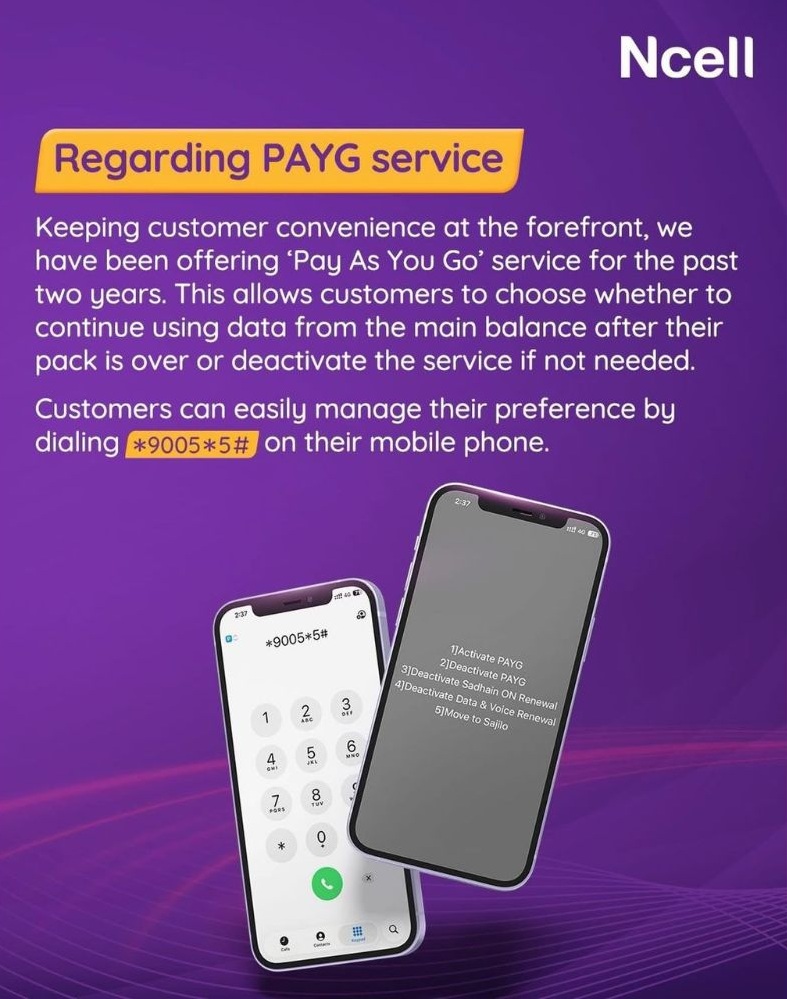
Nepal’s leading private telco, Ncell, has officially notified users of its existing “enable/disable PAYG” (Pay As You Go) on April 09, 2026. The information is issued via a social media post after users expressed curiosity about whether the telco provides this feature.
On short notice, the company said that it has been providing PAYG service for the users for the past two years. It added that the option to activate or deactivate PAYG lets customers decide whether they want to continue using data from their main balance after the pack expires or stop using data to work. Deactivation of PAYG automatically stops data from working, which saves the main balance of the users.

Before we go further on this, it’s worth mentioning that Ncell’s unlimited data/voice pack is now available at Rs 699. The company slashed the previous cost of Rs 1,999 by 65%.
Let’s cut to the chase.
How to enable/disable PAYG in Ncell?
Here are the easy steps to enable/disable the PAYG service in Ncell.
- Open the phone app
- Dial Ncell PAYG code *9005*5#
- Choose to either activate/deactivate PAYG in your SIM
Pro Tip to Save Balance
As you have learned how to turn on/off PAYG in Ncell, here are some pro tips for you to save your balance with data.
- Always turn OFF PAYG after activating a data pack
- Turn ON only when needed
- Monitor usage from phone settings
Benefits of PAYG in Ncell
PAYG is a feature that gives users control over their Ncell data packs. By having this feature, Ncell users can choose to continue using mobile internet with PAYG on. Even after the data pack expires or is used up, you can simply use data by turning on PAYG. But when the pack expires, if the data is used, the balance is deducted.
By deactivating PAYG, you can save your main balance after a pack expires. The option democratizes mobile service for the users.
Ncell notified users of the feature after Ntc started the “enable/disable PAYG option just recently. This led unfamiliar Ncell users to explore whether such a feature is available. Thankfully, it’s been there for the past two years.
It is a feature that allows users to enable/disable PAYG for the data service.
Data works after pack ends, balance is charged.
Activation is free, but data usage is charged.
Disable PAYG using *9005*5#.
Usually, yes, it depends on SIM settings.