• Ntc
  • Ncell
  • Samsung
  • Apple
  • Xiaomi
  • 2G to 5G
  • ISP
  • NTA
  • Tariffs
  • About us
Wednesday, March 4, 2026
NepaliTelecom
  • Home
  • Telecom News
    • News
    • NTA
    • Ntc
    • Ncell
    • Smart Cell
    • Digital Nepal
  • Gadgets
  • How To
  • Editors’ Pick
  • Contact
  • About
No Result
View All Result
  • Home
  • Telecom News
    • News
    • NTA
    • Ntc
    • Ncell
    • Smart Cell
    • Digital Nepal
  • Gadgets
  • How To
  • Editors’ Pick
  • Contact
  • About
No Result
View All Result
NepaliTelecom
No Result
View All Result

Viber launches innovative chat folder for chat organization

Dinesh by Dinesh
March 7, 2024
in Apps, Tech News
Reading Time: 4 mins read
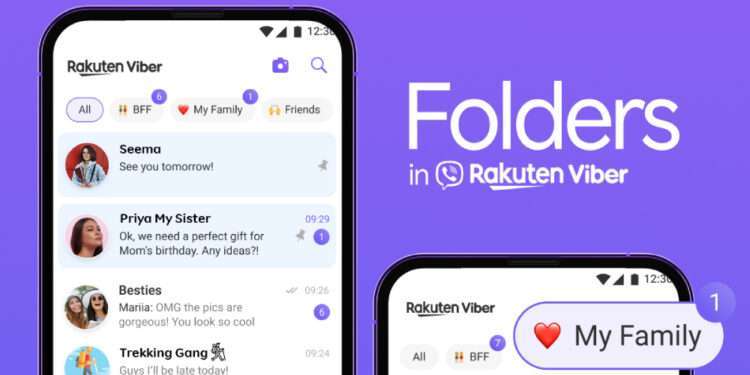
Viber Chat Folders

Rakuten Viber, the world’s leading private and secure messaging and voice-based communication service provider has launched chat folders which allows users to revisit specific previous conversations and elevate their messaging experience.

Rakuten has designed chat folders with user experience in mind. Therefore, a chat folder is now a solution to chat organization. You can find certain chats on the basis of topics, groups, and individuals.

As of late, Rakuten Viber has been busy with AI-inspired features such as a Viber AI chatbot while its parent company Rakuten is also mulling over starting its own Large Language Model AI chatbot for a range of its services. But at the same time, the company continues to bring innovative features and services in Nepal making its presence as prominent as ever.

Viber brings a chat folder feature that efficiently enhances chat organization

The chat folder on the Viber messaging app lets users create up to five custom folders with an “All” tab which contains all the chats. You can use this feature to manage your chats better so that it becomes easier to come back to them later. For e.g., you can create a folder for work, friends, family, and favorites.

Similarly, you can put a chat into multiple folders. You can place a limitless number of chats in a folder. You can customize these chat folders with a name of your choice or mark chats within folders as “read”.

Instant messaging apps are the way of communication for many if not for the majority. We all rely on them for their ability to deliver fast and reliable communication service. But when it comes to managing chats, work remains there. Messaging apps are a global phenomenon and are equally popular in Nepal. Here are the best messaging apps in Nepal.

Viber AI chatbot
AI chat on Viber

Viber comes to the rescue with the chat folder feature. It’s user-friendly and helps us search our way through specific chats. We can group chats as per the kind of talks they are and between the type of people. It can be our friends, office mates, family, or else. Viber allows customizing the chat folders which makes it more useful and worthwhile. For e.g., if you keep all of your friends’ chats inside “Work”, you can manage projects and tasks or set up a birthday event for your peer for the weekend. Then, folders assigned “family” or “friends” can be set as a priority for coordinating an exciting occasion.

Get a reminder of unread chats

Apart from chat folders keeping chats, there are other features to enjoy using. For e.g., the unread badge with a number on the top of a chat folder indicates the same number of unread chats in that particular folder. Besides, any one-on-one chats, group chats, channels, and communities can be added to custom folders barring hidden chats, messages from Viber Pay, businesses, and customer interactions.

“In today’s fast-paced digital world where messaging apps play a paramount role in people’s everyday lives, Rakuten Viber steps in with Folders. Our latest feature is here to elevate conversations and preserve meaningful connections by unlocking time-saving potential and embracing the advantage of simplicity,” comments Ofir Eyal, Rakuten Viber’s CEO.

Viber for many of its features and services remains a solidly top one, here are the 10 most popular mobile apps in Nepal, it’s worth a check!

When will the chat folder arrive on your Viber app?

Rakuten is gradually rolling out a chat folder globally for the Viber app and it should be available to all in the next couple of months. Chat Folders will be available on the Viber app with version 22.0 and above. Users with over 10 chats will be introduced to the Chat Folder once they open the Viber app.

You can activate the Viber Chat Folder by going to More>Manage Folders> Add chats.

Check out: SMS Vs Instant Messaging Apps

For more on this feature as well as other queries regarding Viber services in Nepal, let us know in the comments below.


Follow us on Facebook, Twitter, and Viber to get the latest news, and information about Nepal Telecom, Ncell, Smart Cell, ISPs, mobile apps, and phones in Nepal.

Latest Posts

  • Huawei connects 170 million people via Partner2Connect Digital Coalition
  • iPad Air 2026 launched with M4 chipset, 12 GB RAM, WiFi 7
  • Sparrow SMS launches Keyword Block System to filter election messages in Silence Period
  • Xiaomi Pad 8 launched with 3.2K display, Snapdragon 8s Gen 4
  • iPhone 17e launched with A19 chip, 256 GB base storage
  • Xiaomi 17 launched with 6.3″ display, 6330mAh battery
  • Xiaomi 17 Ultra launched with 6.9-inch display, Leica cameras
Comments
Previous Post

Ntc lowers data roaming charges: Find new tariffs

Next Post

Digital Karnali Conclave 2024 with a 14-point commitment

Dinesh

Dinesh

An experienced tech writer covering news mostly on telecommunication, internet, latest tech & trends, and Gadgets. Being a technophile, I am particularly fascinated by the evolution of mobile networks in Nepal from legacy networks (2G, 3G) to 4G (with VoLTE, VoWiFi, eSIM) and the prospects of the upcoming 5G, and equally enthralled by the development of internet from the dial-up connection to the 2 Gbps XGS-PON fiber broadband technology and their transformative impact in the country.

Related Posts

Huawei Yang Chaobin on ITU Partner2Connect Pledge Target
Tech News

Huawei connects 170 million people via Partner2Connect Digital Coalition

March 4, 2026
How is emergency alarm sent to phones
Tech News

Mobile phones in Gulf blare with emergency alarm as Iran-US exchange war

March 1, 2026
Samsung Galaxy Unpacked Live 2026
Tech News

Galaxy Unpacked 2026: S26 Series, AI, Buds 4 series, more

February 26, 2026
Load More

You may also read

Check voter list online Election commission Nepal

How to check voter ID list details online? Election Commission

March 1, 2026
Ntc FTTH

Nepal Telecom Fiber Internet: Price, Speed, Offer, Packs [2026]

February 5, 2026

Easiest ways to find election 2082 candidate list online

March 2, 2026
how to check Ntc Ncell number owner name and transfer ownership

How to check Ntc, Ncell number owner name & Transfer

February 12, 2026
Nepal Telecom Ntc eSIM

How to Activate Ntc eSIM? Upgrade or New [2026 Update]

February 7, 2026
How to register Voter ID with National ID card NID in Nepal

Register your Voter ID with National ID card

March 1, 2026
NepaliTelecom

Nepalitelecom.com is a website/blog which provides information regarding telecommunication in Nepal along with Gadgets and has been doing some research for the telecom market in Nepal. We intend to do more of such survey/research in the Nepalese Telecom sector.

SiteMap

📢 Follow us on Viber to get the latest news, and information about Nepal Telecom, Ncell, ISPs, mobile apps, and phones in Nepal.

Popular Categories

Ntc | Ncell | Telco News | ISP | NTA | Gadgets

Recent Posts

  • Huawei connects 170 million people via Partner2Connect Digital Coalition
  • iPad Air 2026 launched with M4 chipset, 12 GB RAM, WiFi 7
  • Sparrow SMS launches Keyword Block System to filter election messages in Silence Period

© 2025 Nepalitelecom

No Result
View All Result
  • Home
  • Telco News
  • Gadgets Nepal
  • Nepal Telecom
  • Ncell
  • Digital Nepal
  • How To
  • Editors’ Pick

© 2025 Nepalitelecom