• Ntc
  • Ncell
  • Samsung
  • Apple
  • Xiaomi
  • 2G to 5G
  • ISP
  • NTA
  • Tariffs
  • About us
Saturday, February 21, 2026
NepaliTelecom
  • Home
  • Telecom News
    • News
    • NTA
    • Ntc
    • Ncell
    • Smart Cell
    • Digital Nepal
  • Gadgets
  • How To
  • Editors’ Pick
  • Contact
  • About
No Result
View All Result
  • Home
  • Telecom News
    • News
    • NTA
    • Ntc
    • Ncell
    • Smart Cell
    • Digital Nepal
  • Gadgets
  • How To
  • Editors’ Pick
  • Contact
  • About
No Result
View All Result
NepaliTelecom
No Result
View All Result

Nagarik App big update: Allows screenshot of voter ID

Dinesh by Dinesh
February 21, 2026
in Apps, Digital Nepal
Reading Time: 3 mins read
Nagarik Adhikar app
Summary✨
  • Nagarik App now lets you take a screenshot of your voter ID..
  • The facility has been unlocked to facilitate users for the upcoming elections on Falgun 21..
  • The feature is available on the app’s latest update, version 2.0.90..

Nagarik App now lets you take a screenshot of your voter ID. The facility has been unlocked to facilitate users for the upcoming elections on Falgun 21.

The feature is available on the app’s latest update, version 2.0.90. If you can’t take a screenshot of your voter ID, then you should update the app first. Currently, the features are available on Android only. A plan is in place to roll it out to iOS users very soon.

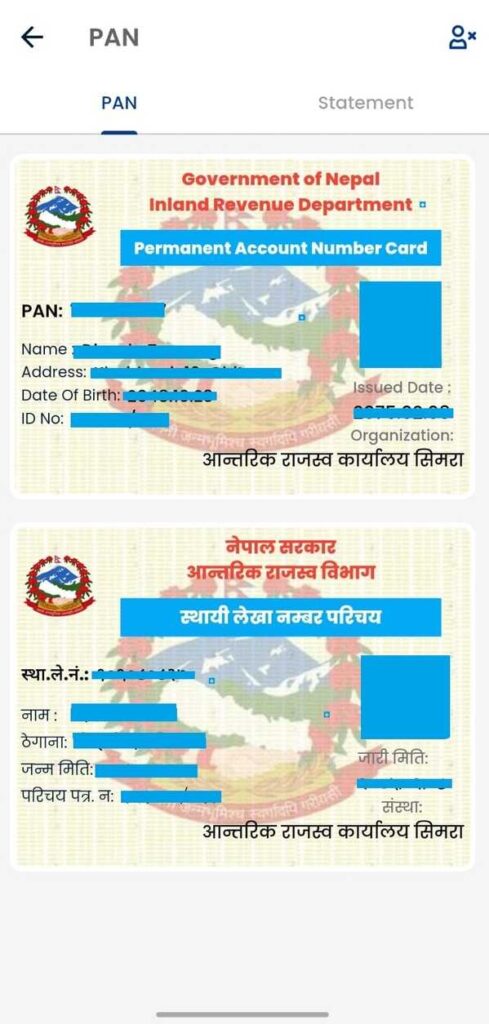
As you know, the app doesn’t allow screenshots. So, I checked myself and found that the screenshot feature is made available for voter ID and PAN card. I am not sure if the facility for the latter is intentional. Still, you can’t take a screenshot of the National ID, citizenship, passport, and your driving license.  

For your reference, here are the screenshots of my voter ID and PAN I took a few minutes ago.
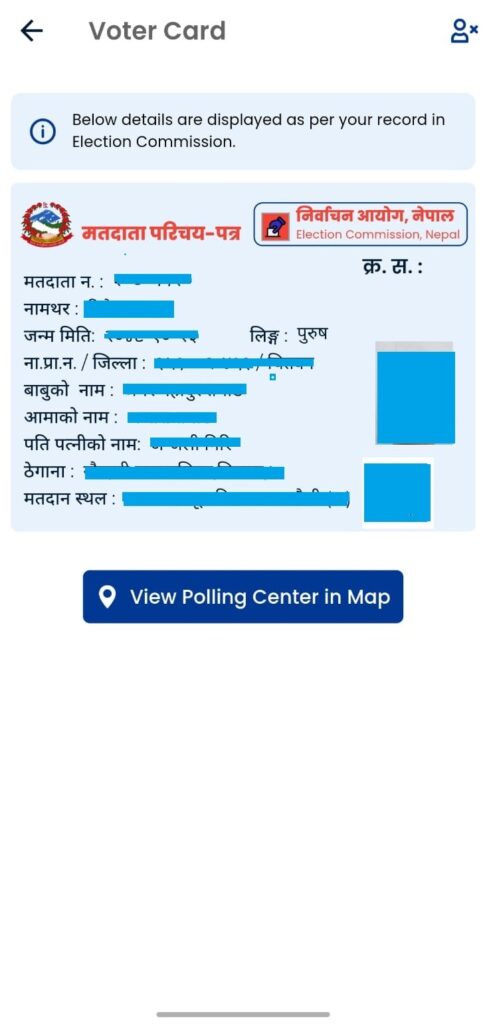
Voter ID screenshot on Nagarik App
PAN screenshot on Nagarik App

Why is it going to be useful?

Having a screenshot of your voter ID can be extremely useful at the polling station on Falgun 21, 2082. Because voter ID is a mandatory document to carry for all eligible voters. Just in case, you don’t carry or forget to bring your physical voter ID card, the one on the Nagarik app will get you through.

You can print a copy of the screenshot of your voter ID to authenticate your voting eligibility at your polling station. Earlier, the government allowed registration of voter ID with National ID number, and now, the screenshot feature further strengthens the use case for the popular government app.

How to take a screenshot of the Voter ID on Nagarik App?

Here are the steps to take a screenshot of your Voter ID on Nagarik App:

  • Open the Nagarik App on your phone
  • Find and tap Voter ID
  • Take a screenshot of the page

PS: Depending on your phone model, you can either press the volume down and power buttons simultaneously or scroll three fingers down the screen to take the screenshot. There could be other methods too, depending on the brands and their OS versions.

Don’t miss: Check your voter ID details online

Why can’t I take a Voter Card screenshot on Nagarik App?

As said above, you first need to update the Nagarik App to its latest version. Otherwise, the steps won’t work. Besides, if you are on iPhones or other iOS devices, then you will have to wait a few days for it.

We suggest they you take a screenshot of your voter ID and save it on your smartphone. In case you don’t bring the official physical copy, this digital copy will be super useful for you.

If you have further queries, let us know in the comments below.

  • Best ways to get the latest General Election Updates and Results

Follow us on Facebook, Twitter, and Viber to get the latest news, and information about Nepal Telecom, Ncell, Smart Cell, ISPs, mobile apps, and phones in Nepal.

Latest Posts

  • Nagarik App big update: Allows screenshot of voter ID
  • Xiaomi, Leica announced new partnership before ’17 series’ global launch
  • Nepal clocks highest internet speed in SAARC: Ookla report
  • Buy an Apple iPhone in EMI with a citizenship | Find plans
  • Honor X5c series launched in Nepal with 6.74-inch display
  • CPN-UML announces: 10 GB data for free for a year
  • Pixel 10a launched with Tensor G4 chip and powerful AI features
Comments
Previous Post

Xiaomi, Leica announced new partnership before ’17 series’ global launch

Dinesh

Dinesh

An experienced tech writer covering news mostly on telecommunication, internet, latest tech & trends, and Gadgets. Being a technophile, I am particularly fascinated by the evolution of mobile networks in Nepal from legacy networks (2G, 3G) to 4G (with VoLTE, VoWiFi, eSIM) and the prospects of the upcoming 5G, and equally enthralled by the development of internet from the dial-up connection to the 2 Gbps XGS-PON fiber broadband technology and their transformative impact in the country.

Related Posts

CPN UML manifesto on internet and connectivity 2082
Digital Nepal

CPN-UML announces: 10 GB data for free for a year

February 19, 2026
Apps

Hamro Patro starts video conferencing service “Chautari Meet”

February 18, 2026
Ncell Super Krishak App
Apps

Ncell, Super Krishak App partner to provide digital agriculture services to farmers

February 12, 2026
Load More

Leave a Reply Cancel reply

Your email address will not be published. Required fields are marked *

You may also read

Ntc Job Vacancy Online Applications

Nepal Telecom Extends job Application 2082 Deadline: How to Apply?

February 18, 2026
Check voter list online Election commission Nepal

How to check voter list details online? Election Commission

February 12, 2026
Ntc FTTH

Nepal Telecom Fiber Internet: Price, Speed, Offer, Packs [2026]

February 5, 2026
how to check Ntc Ncell number owner name and transfer ownership

How to check Ntc, Ncell number owner name & Transfer

February 12, 2026
Nepal Telecom Ntc eSIM

How to Activate Ntc eSIM? Upgrade or New [2026 Update]

February 7, 2026

How to watch T20 World Cup 2026 live in Nepal?

February 8, 2026
NepaliTelecom

Nepalitelecom.com is a website/blog which provides information regarding telecommunication in Nepal along with Gadgets and has been doing some research for the telecom market in Nepal. We intend to do more of such survey/research in the Nepalese Telecom sector.

SiteMap

📢 Follow us on Viber to get the latest news, and information about Nepal Telecom, Ncell, ISPs, mobile apps, and phones in Nepal.

Popular Categories

Ntc | Ncell | Telco News | ISP | NTA | Gadgets

Recent Posts

  • Nagarik App big update: Allows screenshot of voter ID
  • Xiaomi, Leica announced new partnership before ’17 series’ global launch
  • Nepal clocks highest internet speed in SAARC: Ookla report

© 2025 Nepalitelecom

No Result
View All Result
  • Home
  • Telco News
  • Gadgets Nepal
  • Nepal Telecom
  • Ncell
  • Digital Nepal
  • How To
  • Editors’ Pick

© 2025 Nepalitelecom