• Ntc
  • Ncell
  • Samsung
  • Apple
  • Xiaomi
  • 2G to 5G
  • ISP
  • NTA
  • Tariffs
  • About us
Sunday, January 11, 2026
NepaliTelecom
  • Home
  • Telecom News
    • News
    • NTA
    • Ntc
    • Ncell
    • Smart Cell
    • Digital Nepal
  • Gadgets
  • How To
  • Editors’ Pick
  • Contact
  • About
No Result
View All Result
  • Home
  • Telecom News
    • News
    • NTA
    • Ntc
    • Ncell
    • Smart Cell
    • Digital Nepal
  • Gadgets
  • How To
  • Editors’ Pick
  • Contact
  • About
No Result
View All Result
NepaliTelecom
No Result
View All Result

How to add your favorite news source in Top Stories, Google

Dinesh by Dinesh
January 11, 2026
in How To, Tech News
Reading Time: 3 mins read
How to add favorite news source to Top stories Google

Google has rolled out a feature that lets you add your favorite internet news sources to Top Stories in Search. It allows you to stay up to date with your favorite topics on the go from the sources you prefer.

The option to choose users’ preferred source helps them connect with the sites they frequently read and not miss the current developments.

“Once you select your sources, they will appear more frequently in Top Stories or in a dedicated ‘From your sources’ section on the search results page. You’ll still see content from other sites, and can manage your selections at any time,” Google said recently.

So, when you choose your sources, you get their articles more often in Top Stories. If you are unaware, when you search for a new development, Google shows you content in Top Stores. This will show you your search results from the site you choose.

Check out: Most popular apps in Nepal | Wallet to entertainment

Steps to add NepaliTelecom.com in Top Stories in Google Search:

Here are the steps to get your fresh content from NepaliTelecom.com in the Top Stories section in Google Search:

  • Open Chrome and search for a topic that’s trending at the moment
  • Tap on the icon that’s to the right of Top Stories
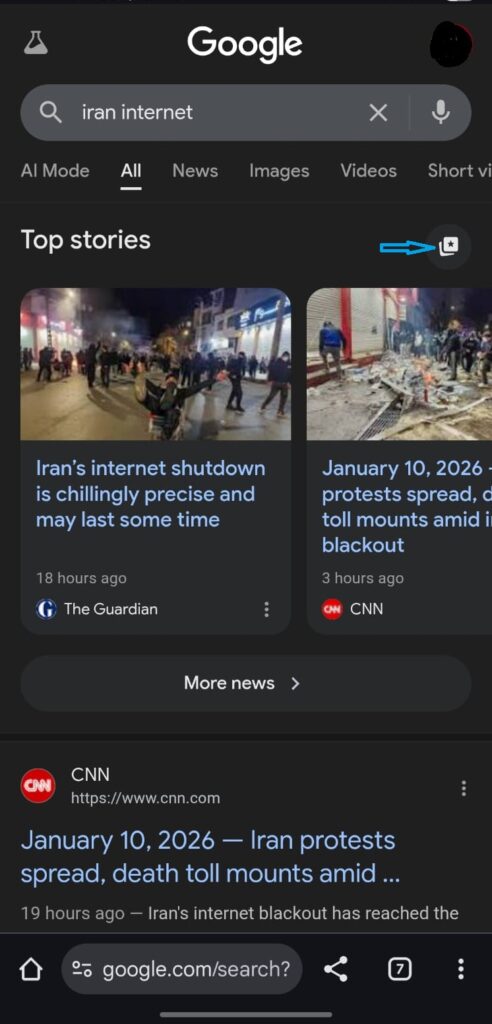
How to select preferred source in top stories in google search
  • In a field, type NepaliTelecom.com and check the box to select it as your preferred source
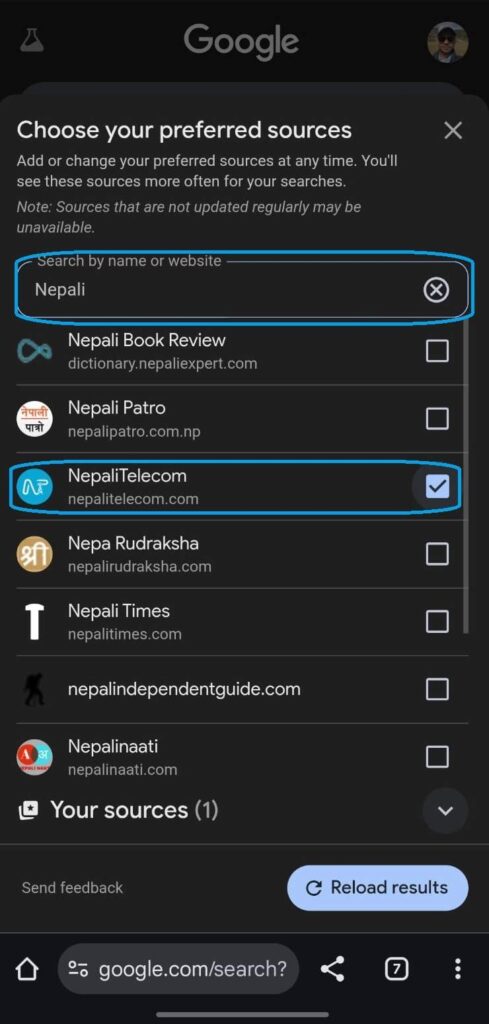
  • Refresh your results, and you get to see more content from the site

What you get with it?

By adding NepaliTelecom.com to your preferred source list for Google’s Top Stories, you get fresh content from us in your Google search. This includes all the important and latest developments in the telecom industry in Nepal, new services from telcos, smartphone launches, tech news, etc. We are proud to mention that we are the No. 1 credible source of Telecom information of Nepal.

You can choose as many sites as you prefer. Research has found that a user can choose an average of four sites as their preferred source for news.

You can follow a similar method to add other sites to your source list.

  • How to check your voter ID online?

Follow us on Facebook, Twitter, and Viber to get the latest news, and information about Nepal Telecom, Ncell, Smart Cell, ISPs, mobile apps, and phones in Nepal.

Latest Posts

  • How to add your favorite news source in Top Stories, Google
  • Nepal Telecom now lets you update KYC online on your phone
  • Nepal Telecom’s FTTH and BTS affected, service restoration work ongoing
  • Ncell launches ‘Yuwa SIM’ for Gen Z with data, unlimited calls, free digital wallet access
  • Proxies Designed for Enhanced Online Gaming Experience
  • Why Businesses Are Investing in Private, Dedicated Network Access
  • Realme to join OPPO as a sub-brand, will affect price rise?
Comments
Previous Post

Nepal Telecom now lets you update KYC online on your phone

Dinesh

Dinesh

An experienced tech writer covering news mostly on telecommunication, internet, latest tech & trends, and Gadgets. Being a technophile, I am particularly fascinated by the evolution of mobile networks in Nepal from legacy networks (2G, 3G) to 4G (with VoLTE, VoWiFi, eSIM) and the prospects of the upcoming 5G, and equally enthralled by the development of internet from the dial-up connection to the 2 Gbps XGS-PON fiber broadband technology and their transformative impact in the country.

Related Posts

Realme Narzo 70 Pro 5G Camera
Gadgets Nepal

Realme to join OPPO as a sub-brand, will affect price rise?

January 9, 2026
WiFi can see people
Tech News

WiFi networks ‘have eyes’ and can detect people walking, Concerns!

January 8, 2026
Internet wires cut Nepal
Tech News

Unmanaged internet wires to be removed in Pokhara

January 7, 2026
Load More

Leave a Reply Cancel reply

Your email address will not be published. Required fields are marked *

You may also read

IPO results Mero share

Now You Can View IPO Results Immediately | CDSC Improves System

November 13, 2021
Ntc FTTH

Nepal Telecom Fiber Internet: Price, Speed, Offer, Packs [2026]

January 7, 2026
how to check Ntc Ncell number owner name and transfer ownership

How to check Ntc, Ncell number owner name & Transfer Ownership

October 19, 2025
Ntc KYC update on phone

Nepal Telecom now lets you update KYC online on your phone

January 11, 2026
Mero Share login

Mero Share: How To Apply for Share (IPO) Online in Nepal?

December 24, 2023
Nepal Telecom Mobile App update

Ntc Brings SIM KYC Update and FTTH Portal on Mobile App

October 19, 2025
NepaliTelecom

Nepalitelecom.com is a website/blog which provides information regarding telecommunication in Nepal along with Gadgets and has been doing some research for the telecom market in Nepal. We intend to do more of such survey/research in the Nepalese Telecom sector.

SiteMap

📢 Follow us on Viber to get the latest news, and information about Nepal Telecom, Ncell, ISPs, mobile apps, and phones in Nepal.

Popular Categories

Ntc | Ncell | Telco News | ISP | NTA | Gadgets

Recent Posts

  • How to add your favorite news source in Top Stories, Google
  • Nepal Telecom now lets you update KYC online on your phone
  • Nepal Telecom’s FTTH and BTS affected, service restoration work ongoing

© 2025 Nepalitelecom

No Result
View All Result
  • Home
  • Telco News
  • Gadgets Nepal
  • Nepal Telecom
  • Ncell
  • Digital Nepal
  • How To
  • Editors’ Pick

© 2025 Nepalitelecom