• Ntc
  • Ncell
  • Samsung
  • Apple
  • Xiaomi
  • 2G to 5G
  • ISP
  • NTA
  • Tariffs
  • About us
Friday, June 19, 2026
NepaliTelecom
  • Home
  • Telecom News
    • News
    • NTA
    • Ntc
    • Ncell
    • Smart Cell
    • Digital Nepal
  • Gadgets
  • How To
  • SpeedTest
  • Contact
  • About
No Result
View All Result
  • Home
  • Telecom News
    • News
    • NTA
    • Ntc
    • Ncell
    • Smart Cell
    • Digital Nepal
  • Gadgets
  • How To
  • SpeedTest
  • Contact
  • About
No Result
View All Result
NepaliTelecom
No Result
View All Result

Home » How To » How to activate Call waiting, Call hold and Call forwarding [2025]

How to activate Call waiting, Call hold and Call forwarding [2025]

NepaliTelecom by NepaliTelecom
April 12, 2025
in How To
Reading Time: 5 mins read
Follow us on

Last Updated on April 12, 2025

Telecom service providers have some supplementary or value-added services to facilitate any time Call communication. Suppose you are on a call, you do not want to miss another urgent call, then you need to enable call waiting. Similarly, call forwarding lets you forward the call to another number while you are away. Find below how to subscribe/activate call waiting, call hold and Call forwarding in Nepal Telecom (NTC) and Ncell GSM mobile.

  • How to send free SMS in Ntc, Ncell?

Table of contents

  • Call waiting
  • How to activate/deactivate Call waiting in Mobile?
  • Call forwarding
  • How to activate/deactivate Call forwarding?
  • How to activate/deactivate call transfer in Nepal Telecom Mobile?
  • Call forwarding in Ntc landline
  • Cost of forwarding

Call waiting

Call waiting is a telecom service that enables a subscriber to have a call in progress to accept another call. So the customer can switch to another call, making the current call in the hold. This service is free in both NTC and Ncell.
How to activate/deactivate Call waiting in Mobile?

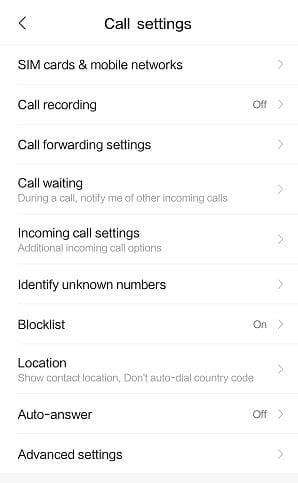
To activate Call waiting feature in mobile, customer need

  • to dial *43#
  • Or you can enable it in the “call settings” of your mobile phone.

To deactivate Call waiting feature, customer need

  • to dial #43#
  • Or from the call settings of the mobile phone.

To know the status of the “call waiting” feature, customer need

  • to dial *#43#

Similarly, Call hold is a feature that allows the customer to place an active call on hold and initiate another call or answer an incoming call. This service does not require activation as it is already activated for free in Ntc and Ncell.

  • Missed Call Alert (MCA) in Ntc, Ncell

Call forwarding

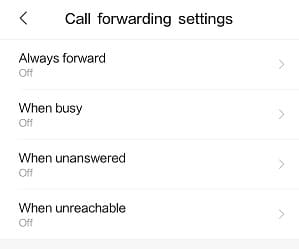
Call Forwarding is another feature that enables the forwarding of incoming calls to another number. Customers can enable forwarding in different conditions like busy, switch off, no reply, not reachable, or unconditional (for all cases).
How to activate/deactivate Call forwarding?

Here are the ways to enable/activate call forwarding for different conditions.

  • Unconditional Forward( dial **21*Number# to activate, ##21# to deactivate
    Forwards all of your incoming call to another phone number.
  • Forward when busy (Dial **67* Number# to activate, ##67 # to deactivate)
    Forwards an incoming call when you are busy with another call.
  • Forwarding when no reply (**61*Number# to activate, ##61 # to deactivate)
    Forwards the call when you did not answer an incoming call.
  • Forwarding when not reachable (**62*Number# to activate, ##62# to deactivate)
    Forwards the call when your phone is out of network coverage or phone is switched off.
  • You can also enable or disable the call forwarding by going to call settings of your phone and selecting call forwarding. You need to select the conditions to enable the call forwarding.
  • Namaste Credit loan Sapati in Ntc.

How to activate/deactivate call transfer in Nepal Telecom Mobile?

To activate call transfer in Ntc mobile,

  • you need to dial **21*98xxxxxxxx# where 98xxxxxxx is the number to forward when people dial your mobile number. This is an unconditional call transfer.

To deactivate call transfer in Ntc mobile,

  • you need to dial ##002# which will cancel all of the forwards/transfer enabled from your number.

Call forwarding in Ntc landline

To enable call forwarding in Nepal Telecom landline unconditionally, you need to dial

  • *21*phone no# at first, if it works it’s fine otherwise you need to dial below.
  • *21*LC*phone no# where LC means the lock code (that you need to take from Ntc) and phone no refers to the number that you want to forward the call.

To transfer the call when you the dialed number is busy, you need to dial

  • *60*LC*phoneno# Or *60*phoneNo#

To transfer call when the number is not picked/answered after 4 call rings,

  • *61*LC*phoneno# Or *61*phoneNo#

Cost of forwarding

Although the activation charge is for free, you need to pay for the transferred call to another number by the duration of the call. If “A-number” is making a call to “B-number” and “B-number” forwards call to “C-number” then “A-number” pays as if it is calling “B-number” and “B-number” needs to pay as if it is calling “C-number”.

Do not forget to read all the latest Ntc data pack.

If you have any queries regarding the call transfer, call waiting, you can comment below.

Follow us on Facebook, Google News, and Viber to get the latest news, and information about Nepal Telecom, Ncell, Smart Cell, ISPs, mobile apps, and phones in Nepal.

Latest Posts

  • Ericsson Mobility Report 2026: 5G hits 3 billion, Uplink is the new battleground
  • Government regulates OTTs: NetTV, NTTV comes under ruling
  • Hello Sarkar to get AI integration, work via app, web, social media
  • Springbase.ai available in Nepal to transform businesses
  • eSewa, IMS launch Enterprise Payment Solution for clients
  • Ncell paid government Rs 14.51 arba tax in nine months of FY 2082/83
  • Nepal Telecom warns customers about fraudulent SMS regarding bank, ConnectIPS
Comments
Previous Post

Nepal connects to China Internet, breaks Indian monopoly

Next Post

NTA Implementing Digital KYC for SIM Card; Invites Consultants

NepaliTelecom

NepaliTelecom

Related Posts

How to watch world cup Football matches in Nepal
How To

How to Watch Football World Cup 2026 Live in Nepal? Find All Fixtures

June 11, 2026
How mobile network works
How To

How does Mobile network work? Complete Guide to Signal, Towers

May 30, 2026
How to find who is connected or using your Wifi internet?
How To

How to See Who’s Using Your WiFi: 5 Methods (Nepal 2026)

May 26, 2026
Load More

You may also read

How to watch world cup Football matches in Nepal

How to Watch Football World Cup 2026 Live in Nepal? Find All Fixtures

June 11, 2026
Ntc FTTH

Nepal Telecom Fiber Internet: Price, Speed, Offer, Packs [2026]

June 12, 2026
FIFA World cup 2026 full fixtures in Nepali time

FIFA World Cup 2026: Schedule in Nepali Time, Groups & Venues

June 2, 2026
DGo app FIFA World cup 2026 Streaming Nepal fee

DGo app to stream FIFA World Cup 2026 matches, subscription fee out!

June 11, 2026
FIFA Football World Cup 2026 Fixtures

Himalaya Sports to broadcast FIFA Football World Cup 2026

May 14, 2026
How to check SEE Result 2082 online Nepal

How to Check SEE Result 2082 Online: NTC, SMS, Websites & Marksheet Guide

May 11, 2026
NepaliTelecom

Nepalitelecom.com is a website/blog which provides information regarding telecommunication in Nepal along with Gadgets and has been doing some research for the telecom market in Nepal. We intend to do more of such survey/research in the Nepalese Telecom sector.

SiteMap

📢 Follow us on Viber to get the latest news, and information about Nepal Telecom, Ncell, ISPs, mobile apps, and phones in Nepal.

Popular Categories

Ntc | Ncell | Telco News | ISP | NTA | Gadgets

Recent Posts

  • Ericsson Mobility Report 2026: 5G hits 3 billion, Uplink is the new battleground
  • Government regulates OTTs: NetTV, NTTV comes under ruling
  • Hello Sarkar to get AI integration, work via app, web, social media

© 2026 Nepalitelecom

No Result
View All Result
  • Home
  • Telco News
  • Gadgets Nepal
  • Nepal Telecom
  • Ncell
  • Digital Nepal
  • How To
  • Editors’ Pick

© 2026 Nepalitelecom