• Ntc
  • Ncell
  • Samsung
  • Apple
  • Xiaomi
  • 2G to 5G
  • ISP
  • NTA
  • Tariffs
  • About us
Saturday, January 17, 2026
NepaliTelecom
  • Home
  • Telecom News
    • News
    • NTA
    • Ntc
    • Ncell
    • Smart Cell
    • Digital Nepal
  • Gadgets
  • How To
  • Editors’ Pick
  • Contact
  • About
No Result
View All Result
  • Home
  • Telecom News
    • News
    • NTA
    • Ntc
    • Ncell
    • Smart Cell
    • Digital Nepal
  • Gadgets
  • How To
  • Editors’ Pick
  • Contact
  • About
No Result
View All Result
NepaliTelecom
No Result
View All Result

Ncell Brings Online Recharge Service to Top-up Your Mobile

NepaliTelecom by NepaliTelecom
August 9, 2024
in How To, Ncell
Reading Time: 3 mins read

Ncell, the private telecom operator of Nepal, has started an online recharge service. Ncell online recharge can be done through debit and credit cards of Visa, Master Card, and Union pay. Through a new portal, Ncell customers can recharge their prepaid balance or pay their bill of the postpaid phone in Nepal.

  • Read about the latest Ncell Data Packs.

Ncell started this online recharge service to encourage people for digital service. The traditional recharge or pay bill of their mobile can also be done online means using the recharge card PIN. As Ncell provided this recharge service, Ntc also adds this feature to top-up their mobile from bank debit/credit cards. Read more on this Ntc Online Recharge.

How to recharge Ncell Mobile Online?

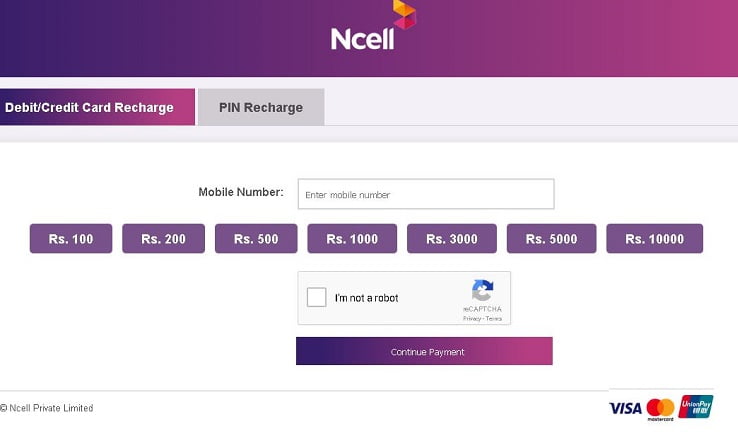
To recharge Ncell mobile online, first, you need to have a bank card (debit or credit) or Visa, or Union pay or recharge card, or digital wallet accounts. Then you can follow the following steps to make the recharge.

  • Visit the Ncell Recharge portal or use Ncell official app.
  • Enter the mobile number and the balance amount to top-up for recharge through bank cards. OR directly input the mobile number and recharge PIN code (scratch card) in case of recharge through the recharge card.
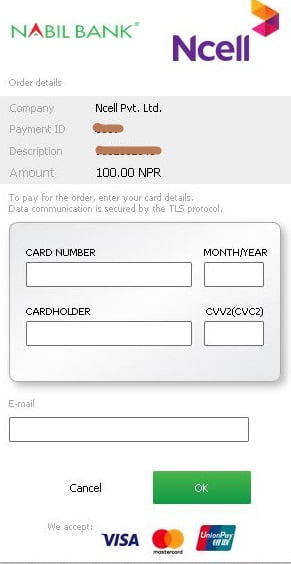
  • After clicking next, you need to put the card number and details. Then your number will recharge through the card. The data communication is known to be secure so you need not worry about putting your account details.
  • You also get options to pay using digital wallets like eSewa, Khalti, IMEPay, Prabhu Pay, and direct bank transfer with Connect IPS.

Find all of the methods to make the recharge of Ntc, Ncell, Smart Cell SIM.
Ncell is also encouraging their digital interaction with customers through chatbot and social media feedback/ comments. They are even attending to customers’ problems from social media (Fb, Twitter) to solve the problem instantly.

Don’t forget to read Important numbers/codes in Ncell.

Tell us what do you think of the Ncell online recharge service using credit/debit cards and digital payment services? Do comment below.


Follow us on Facebook, Twitter, and Viber to get the latest news, and information about Nepal Telecom, Ncell, Smart Cell, ISPs, mobile apps, and phones in Nepal.

Latest Posts

  • Government to study tax policies, possible discount for telcos, ISPs
  • Learn why “Are You Dead” app has gone viral
  • National ID outage on Nagarik App, find other affected services
  • MediaTek launches Dimensity 9500s and Dimensity 8500
  • Ncell renews its internet service license
  • Ncell Reassures Data Privacy As Political Texts Trigger Fear
  • Nepal Telecom hosts 18th AGM, Major projects coming!
Comments
Previous Post

Ncell mela to happen in 4 cities, 4G fun carnival begins on Dec 23

Next Post

Xiaomi Redmi 5 and 5 plus available in China. The first impressions

NepaliTelecom

NepaliTelecom

Related Posts

Ncell logo and tower
Ncell

Ncell renews its internet service license

January 15, 2026
Ncell logo
Ncell

Ncell Reassures Data Privacy As Political Texts Trigger Fear

January 14, 2026
How to add favorite news source to Top stories Google
How To

How to add your favorite news source in Top Stories, Google

January 11, 2026
Load More

You may also read

Ntc FTTH

Nepal Telecom Fiber Internet: Price, Speed, Offer, Packs [2026]

January 7, 2026
how to check Ntc Ncell number owner name and transfer ownership

How to check Ntc, Ncell number owner name & Transfer Ownership

October 19, 2025
Nepal Telecom Ntc customer care numbers

Ntc Customer Care Number for Complain & Info Query [2025]

September 23, 2025
Ntc KYC update on phone

Nepal Telecom now lets you update KYC online on your phone

January 11, 2026
Nepal Telecom Ntc eSIM

How to Activate Ntc eSIM? Upgrade or New [2026 Update]

January 13, 2026
Check voter list online Election commission Nepal

How to check voter list details online? Election Commission

December 11, 2025
NepaliTelecom

Nepalitelecom.com is a website/blog which provides information regarding telecommunication in Nepal along with Gadgets and has been doing some research for the telecom market in Nepal. We intend to do more of such survey/research in the Nepalese Telecom sector.

SiteMap

📢 Follow us on Viber to get the latest news, and information about Nepal Telecom, Ncell, ISPs, mobile apps, and phones in Nepal.

Popular Categories

Ntc | Ncell | Telco News | ISP | NTA | Gadgets

Recent Posts

  • Government to study tax policies, possible discount for telcos, ISPs
  • Learn why “Are You Dead” app has gone viral
  • National ID outage on Nagarik App, find other affected services

© 2025 Nepalitelecom

No Result
View All Result
  • Home
  • Telco News
  • Gadgets Nepal
  • Nepal Telecom
  • Ncell
  • Digital Nepal
  • How To
  • Editors’ Pick

© 2025 Nepalitelecom