• Ntc
  • Ncell
  • Samsung
  • Apple
  • Xiaomi
  • 2G to 5G
  • ISP
  • NTA
  • Tariffs
  • About us
Saturday, January 17, 2026
NepaliTelecom
  • Home
  • Telecom News
    • News
    • NTA
    • Ntc
    • Ncell
    • Smart Cell
    • Digital Nepal
  • Gadgets
  • How To
  • Editors’ Pick
  • Contact
  • About
No Result
View All Result
  • Home
  • Telecom News
    • News
    • NTA
    • Ntc
    • Ncell
    • Smart Cell
    • Digital Nepal
  • Gadgets
  • How To
  • Editors’ Pick
  • Contact
  • About
No Result
View All Result
NepaliTelecom
No Result
View All Result

Nepal Engineer’s Association (NEA) starts online member registration and renewal

NepaliTelecom by NepaliTelecom
August 18, 2022
in Digital Nepal, How To, Tech News
Reading Time: 3 mins read

Nepal Engineer’s Association (NEA) has started registering new members online for some months. Now they have also added the renewal of already registered NEA members from their online portal. It also includes life membership. Please find the details for how to register NEA membership online, renew an existing membership, and do the payment. They can use digital wallets like eSewa, Khalti to pay for the registration.

NEA is the professional body for all of the Nepalese Engineers. NEA now provides this online registration of their new membership and renewal from their website. Previously, you need to take general membership for 5 years to become a life member. But now, all new engineers can become a life member from the very first day.

How to register online for NEA membership and renewal?
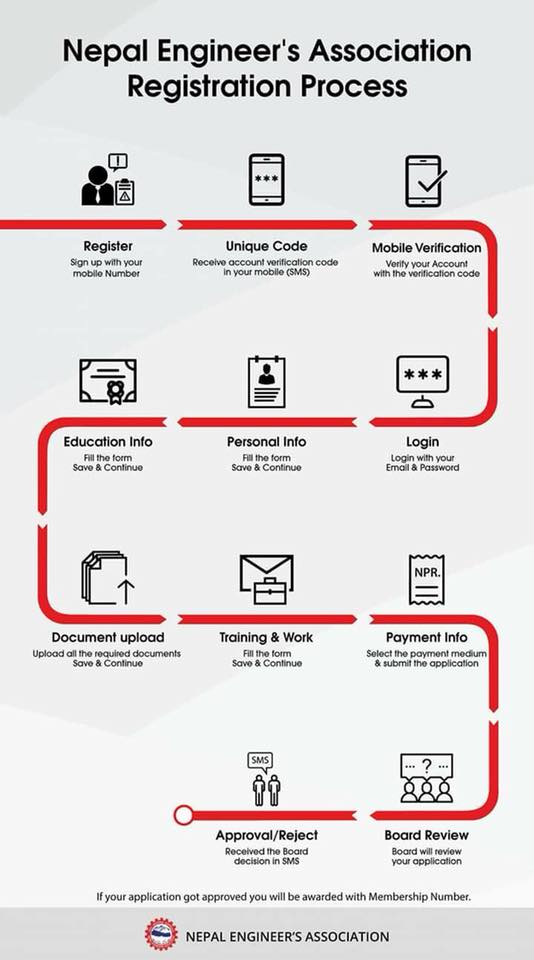
New membership

For a new membership registration online, here is the complete procedure.

  • First, visit the NEA website for online registration.
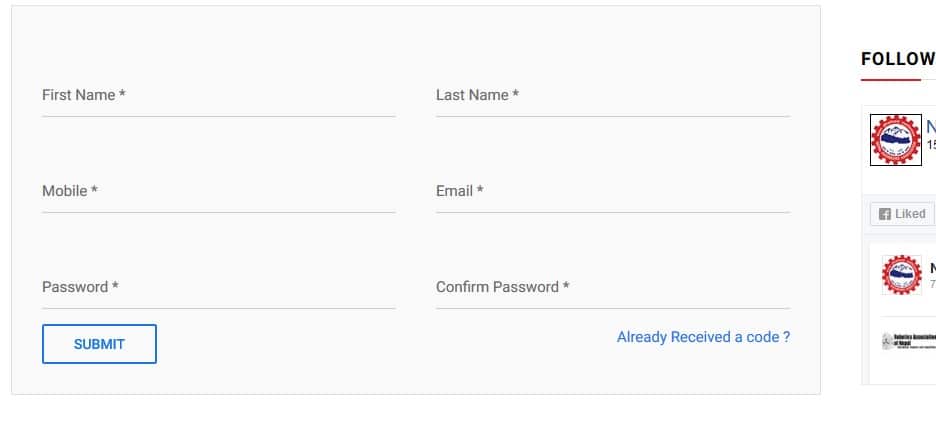
  • Provide your details and Sign up For NEA Membership Registration Form.
  • Please provide your original scan copy of documents or notary copy of documents.
  • Get Unique Code in your Mobile and Verify the unique code.
  • Fill all the required fields online.
  • Submit Registration form online.
  • Be an NEA Member.
  • Please pay using eSewa, Khalti, or cash deposit in Nepal Investment Bank Ltd. (Account No.: 00405010035597). You have to provide a photo of the cash deposit slip.
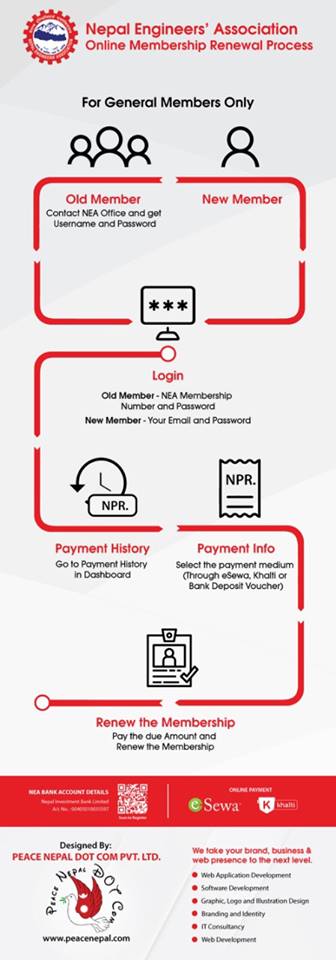
Renew/ life member
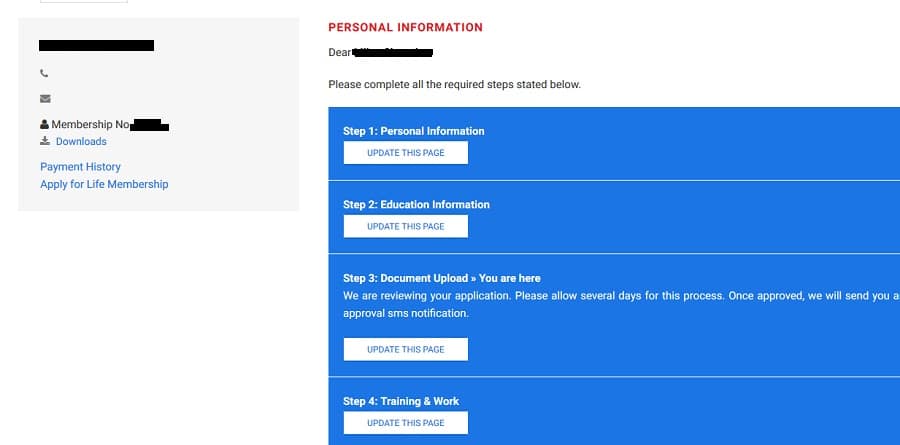
For renewal of the already registered (including life membership), Here is the complete process.

  • Go to the NEA website and visit the members’ login on the left top. OR visit the link here.
  • For the login details, Enter your Nea membership number as username and password as a nea_membership number. Suppose if your NEA membership number is 11000, you need to put 11000 as username and nea_11000 as a password.
  • You can update your personal information, educational information on the profile page.
  • You can even change your password so as to avoid others to use later.
  • Similarly, you can view the payment history to find the remaining dues and make a payment with the link below.
  • You can even apply for life membership just below the payment history and make payment.
  • You can select any of the payment methods like eSewa, Khalti, or bank deposit (Nepal Investment Bank Ltd. Account No.: 00405010035597).
  • For life membership, you need to add your signature with an image file as well.

If you encounter any issue with the online registration, please contact the NEA office at Pulchowk with telephone number +977-1-5010251, 5010252, or email at info@neanepal.org.np.

We (Nepali telecom) would like to congratulate NEA for building this online membership registration and renewal. Adoption of the digital platform for this sort of registration by Nepali Engineers shall encourage more organizations to follow this kind of process and help build a digital Nepal.


Follow us on Facebook, Twitter, and Viber to get the latest news, and information about Nepal Telecom, Ncell, Smart Cell, ISPs, mobile apps, and phones in Nepal.

Latest Posts

  • National ID outage on Nagarik App, find other affected services
  • MediaTek launches Dimensity 9500s and Dimensity 8500
  • Ncell renews its internet service license
  • Ncell Reassures Data Privacy As Political Texts Trigger Fear
  • Nepal Telecom hosts 18th AGM, Major projects coming!
  • Nepal Telecom migrating data to a new SMSC system, SMS disturbance!
  • Nepal Telecom releases statement on political ‘VAS’ messages
Comments
Previous Post

Prabhu Group starts Prabhu Pay mobile wallet app

Next Post

Ntc MD Kamini Rajbhandari again asked to clarify

NepaliTelecom

NepaliTelecom

Related Posts

National ID card on Nagarik App live
Tech News

National ID outage on Nagarik App, find other affected services

January 16, 2026
Apple Google partnership for Gemini for Siri
Tech News

Apple seeks Gemini AI help for customized Siri experience

January 13, 2026
Munal satellite launch failed
Tech News

Nepali students made Munal satellite launch ‘failed’, latest setback for ISRO

January 13, 2026
Load More

You may also read

Ntc FTTH

Nepal Telecom Fiber Internet: Price, Speed, Offer, Packs [2026]

January 7, 2026
how to check Ntc Ncell number owner name and transfer ownership

How to check Ntc, Ncell number owner name & Transfer Ownership

October 19, 2025
Nepal Telecom Ntc customer care numbers

Ntc Customer Care Number for Complain & Info Query [2025]

September 23, 2025
Ntc KYC update on phone

Nepal Telecom now lets you update KYC online on your phone

January 11, 2026
Nepal Telecom Ntc eSIM

How to Activate Ntc eSIM? Upgrade or New [2026 Update]

January 13, 2026
Check voter list online Election commission Nepal

How to check voter list details online? Election Commission

December 11, 2025
NepaliTelecom

Nepalitelecom.com is a website/blog which provides information regarding telecommunication in Nepal along with Gadgets and has been doing some research for the telecom market in Nepal. We intend to do more of such survey/research in the Nepalese Telecom sector.

SiteMap

📢 Follow us on Viber to get the latest news, and information about Nepal Telecom, Ncell, ISPs, mobile apps, and phones in Nepal.

Popular Categories

Ntc | Ncell | Telco News | ISP | NTA | Gadgets

Recent Posts

  • National ID outage on Nagarik App, find other affected services
  • MediaTek launches Dimensity 9500s and Dimensity 8500
  • Ncell renews its internet service license

© 2025 Nepalitelecom

No Result
View All Result
  • Home
  • Telco News
  • Gadgets Nepal
  • Nepal Telecom
  • Ncell
  • Digital Nepal
  • How To
  • Editors’ Pick

© 2025 Nepalitelecom