Last Updated on September 16, 2026
Summary✨
- The Federal Parliament Secretariat has launched the Digital Parliament Platform for public testing to enhance transparency and information dissemination.
- Users can provide feedback during the testing phase by emailing digital@parliament.gov.np.
- The platform features real-time data, such as the total number of MPs, average attendance, and current meetings, emphasizing transparency and accountability.
- Users can easily navigate to find MPs, committees, and meeting details, enhancing user experience.
- Overall, the Digital Parliament is user-friendly, sophisticated, and sets a benchmark for technology-friendly governance.
The Federal Parliament Secretariat has launched the Digital Parliament Platform, making it publicly available for testing. In a statement issued today (September 16), the Secretariat said that the platform has gone live for trial, in accordance with its decision dated September 1, 2026 (Bhadra 15, 2083 BS).
Digital Parliament Platform of Nepal
The Secretariat has said that the Digital Parliament platform is designed to promote transparency and disseminate information and other related content available on the platform.
The Secretariat states that there could be errors and space for improvement as it’s a testing phase. This is why it has requested users to offer their suggestions and feedback on how it can see more improvements.
To send feedback for the Digital Parliament platform, you need to send it to digital@parliament.gov.np.
✔️Find Out Our List of Top 5 Video Conferencing Apps
Digital Parliament Platform Features
Published as a web portal, the Digital Parliament Platform looks sophisticated in its feel and features.
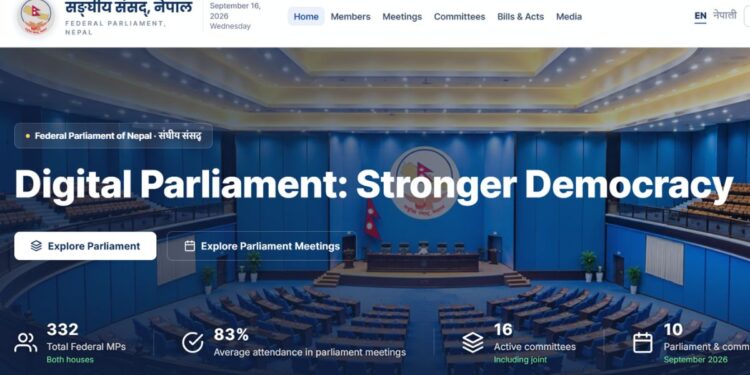
On the home page, you see Digital Parliament: Stronger Democracy, suggesting the rationale behind its launch. Transparency and accountability, and digital governance are the key running themes here.
Right on the home page, you can see the total number of federal MPs in both houses, the average attendance of MPs in parliament meetings, the number of active committees, and the number of parliament and committee meetings in the current month, which is September for now.
Going further, the options at the top look properly placed. Besides, you can also change the language for your convenience. Likewise, you can click to view the members of the House of Representatives (HoR) (275 members) and the National Assembly (NA) (57/59 members). On the left side, you can see the MPs as per their parties. You can sort out the name list by alphabetical order, party, attendance, and province.
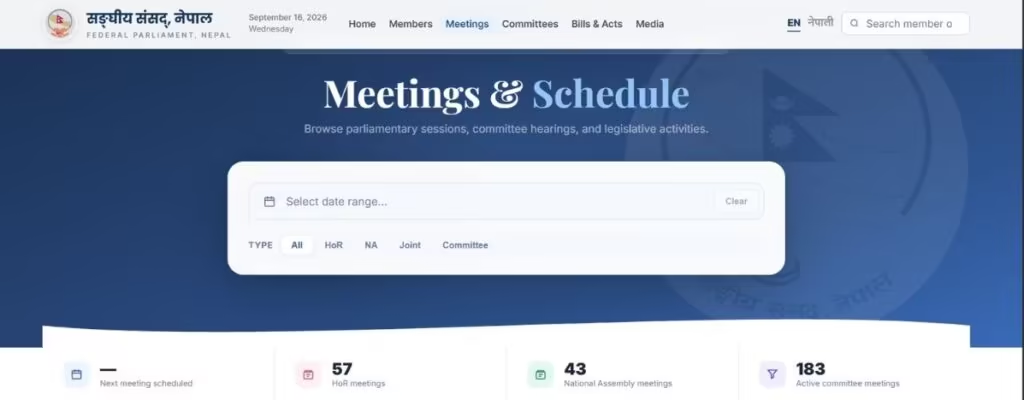
Similarly, you can also search for meetings that took place between two different dates. You can search for meetings among HoR, NA, Joint, and Committees.
Continuing from the top options, you can click on Committees to find out about different committees at the federal parliament. It’s also useful for educational purposes. I clicked on Bills & Acts and Media, but the portal said that the related materials will soon be made available.
✅ How to Read Nepali Newspaper/ePaper Online?
More details are found as you scroll down
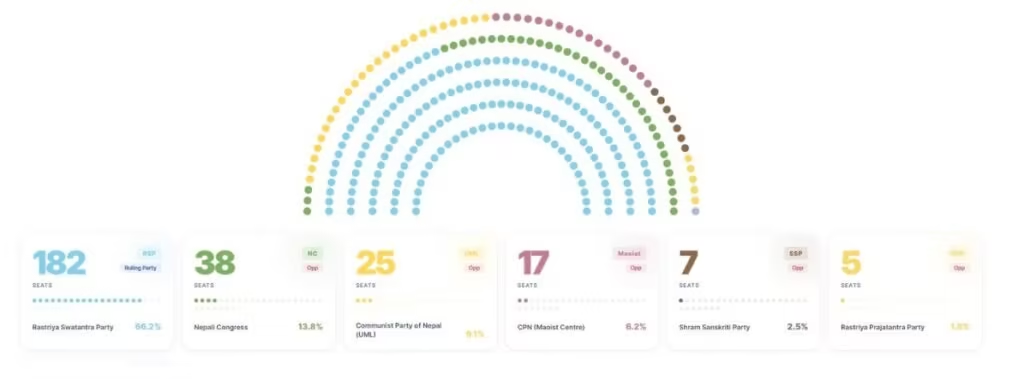
You go down, and you see the leadership of the federal parliament. And you don’t have to click on the top option to find the MPs. Keep scrolling down, and you get the list of MPs. The dashboard shows the seats according to the parties. Each party is assigned colors that resemble their party colors, or faintly so. You also see the parliament committees, their chairpersons, etc.
My verdict on the Digital Parliament
The Digital Parliament looks posh. It’s rich with features, and the interface for me is the highlight. It works. Details are thoroughly updated, and it doesn’t seem like fluff in themes and colors. Internet users can easily navigate through options and find the MPs, parliamentary committees, meeting details, etc. It appears that the platform is the latest benchmark in the direction of more technology-friendly governance.