• Ntc
  • Ncell
  • Samsung
  • Apple
  • Xiaomi
  • 2G to 5G
  • ISP
  • NTA
  • Tariffs
  • About us
Thursday, July 2, 2026
NepaliTelecom
  • Home
  • Telecom News
    • News
    • NTA
    • Ntc
    • Ncell
    • Smart Cell
    • Digital Nepal
  • Gadgets
  • How To
  • SpeedTest
  • Contact
  • About
No Result
View All Result
  • Home
  • Telecom News
    • News
    • NTA
    • Ntc
    • Ncell
    • Smart Cell
    • Digital Nepal
  • Gadgets
  • How To
  • SpeedTest
  • Contact
  • About
No Result
View All Result
NepaliTelecom
No Result
View All Result

Home » Tech News » Google Launches Nearby Share App for Windows to Share Files With Android

Google Launches Nearby Share App for Windows to Share Files With Android

Dinesh by Dinesh
April 2, 2023
in Apps, Tech News
Reading Time: 3 mins read
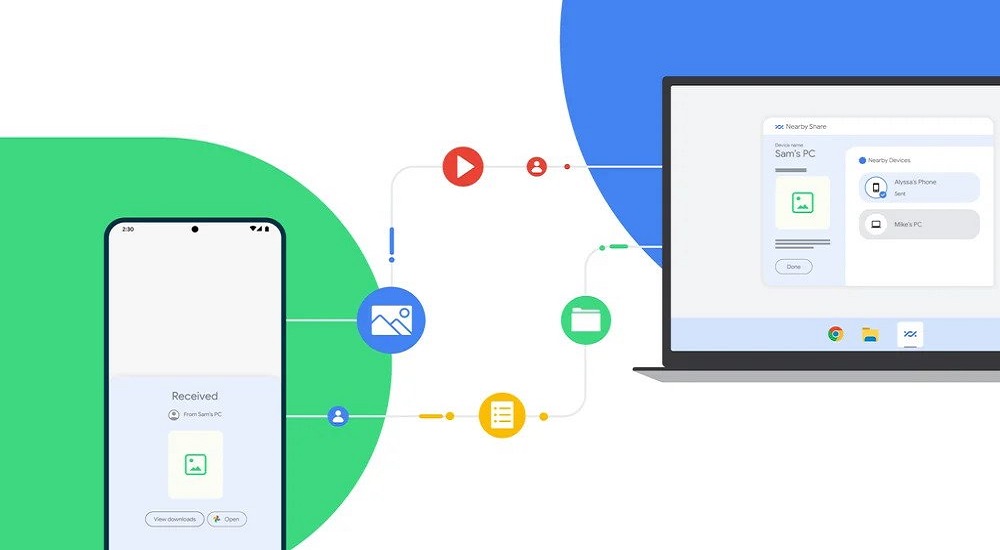
Nearby Share app for Windows
Follow us on

Last Updated on April 2, 2023

Sharing files between Android and Windows has become now easier thanks to Google which has launched the Nearby Share beta app for Windows computers.  

In 2020, the company released the sharing app for Android. Now, it lets 3 billion Android devices send and receive files across phones, tablets, and Chromebooks. Expanding its usability, the US-based tech giant has launched Nearby Share for Windows which is available in select regions.

And don’t fret, Nearby Share is available in Nepal. Therefore, you can download, install and start sharing files between your Android smartphone with your Windows PC.

Check out: How To Transfer Files From Mobile To PC; 5 Handpicked Methods

How to use it?

Using the Nearby Share app on Windows is easy. All it needs is a few-steps setup. Download and install the Nearby Share Beta App for Windows. Sign in with an account (preferably), looks for the available Android device and you can start sending and receiving the files.
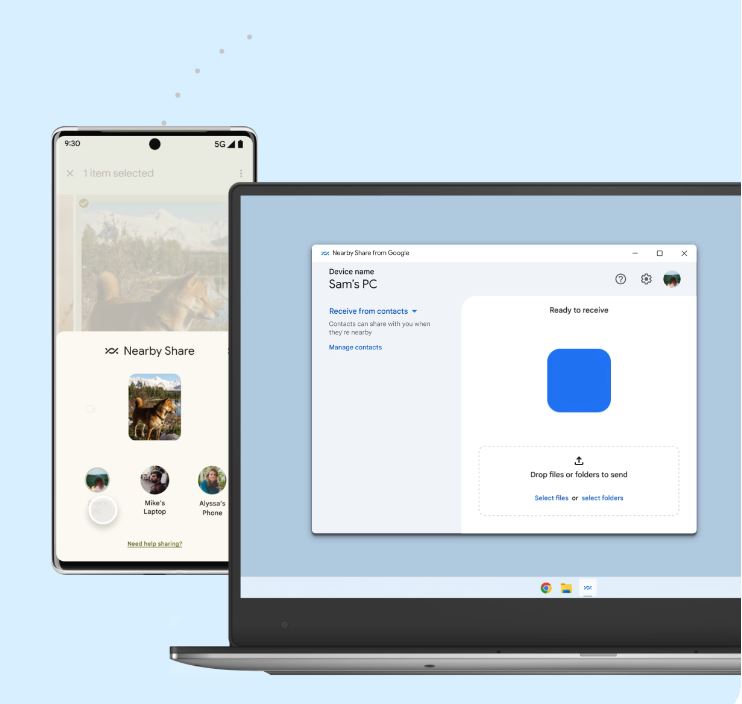
File transfer Nearby Share Windows app to Android

The app works on your computer when you launch it or also in the background. You can send photos, videos, or documents to your Android by simply dragging and dropping them. Just when you drop a file or files, the app looks for an available device for you to select and the transfer initiates. You can also manually select files or folders from the bottom.  

nearby share app windows
Nearby Share app on windows allows you to drag and drop or manually select files or folders to share them with Android

If both your Android and Windows are logged into the same Google account, file transfers work seamlessly even with your phone’s screen off.

“Whether it’s sharing a photo, link or document, there are many ways Nearby Share can help you throughout your day“

-Google (via its blogpost)

Currently, the beta version app supports file-sharing with Android phones and tablets. Google says it will expand support for content sharing to more Google ecosystem devices soon.

Also read: OPPO, Vivo and Xiaomi partner to bring cross-brand file sharing

Steps to use the Nearby Share app on Windows PCs

Follow the easy steps below to start using the Nearby Share beta app on Windows:

  • Download and install the app on your Windows machine.
  • Log in to your Google account.
  • Set Device Visibility preferences to determine who can share with you.
  • Add files or folders or drag and drop them and select an Android device to share them with.

Check out: Smartphone Vs Laptop; Which one to Prefer? >>

If you are in the habit of frequent file transfers between your Android and Windows device, then this app could be a default go. Because it is easy to use and fast in the process. We recommend you use the app and share with us how you felt using it in our comments below.


Follow us on Facebook, Google News, and Viber to get the latest news, and information about Nepal Telecom, Ncell, Smart Cell, ISPs, mobile apps, and phones in Nepal.

Latest Posts

  • Nepal Telecom to home deliver SIM card by postal service from Shravan 1, 2083
  • Ncell requests old SIM users to get USIM for 4G benefits
  • Vivo Y500 launched in Nepal rocking an 8100mAh battery
  • Nepal Telecom starts 4G in Murma Top, Mugu district
  • WhatsApp to allow chats without phone number, using username
  • NetTV obtains license as an OTT platform, commits to better content in future
  • Ncell shutting down 3G network in 5 provinces from Asar 22
Comments
Previous Post

Apple’s “Most Exciting Yet” WWDC 2023 Date Announced, What’re Expected?

Next Post

Redmi Note 12 Price in Nepal | Snapdragon 685 SoC | Detail Specs

Dinesh

Dinesh

Senior Editor; An experienced tech writer covering news mostly on telecommunication, internet, latest tech & trends, and Gadgets. Being a technophile, I am particularly fascinated by the evolution of mobile networks in Nepal from legacy networks (2G, 3G) to 4G (with VoLTE, VoWiFi, eSIM) and the prospects of the upcoming 5G, and equally enthralled by the development of internet from the dial-up connection to the 2 Gbps XGS-PON fiber broadband technology and their transformative impact in the country.

Related Posts

WhatsApp
Apps

WhatsApp to allow chats without phone number, using username

June 30, 2026
NetTV Nepal
Apps

NetTV obtains license as an OTT platform, commits to better content in future

June 29, 2026
D Go OTT platform in Nepal
Apps

DGo becomes first OTT streamer to be licensed in Nepal

June 23, 2026
Load More

You may also read

Ntc FTTH

Nepal Telecom Fiber Internet: Price, Speed, Offer, Packs [2026]

June 12, 2026
Keep you Nepali SIM for life avoid telco reselling to a new user

How to Keep Your Nepali SIM Number for Life (NTC & Ncell)

June 29, 2026

Nepal Telecom’s int’l roaming service problem resolved after ~24 hours

June 27, 2026
How to watch world cup Football matches in Nepal

How to Watch Football World Cup 2026 Live in Nepal? Find All Fixtures

June 11, 2026
Ntc Naamste Recurring pack

Ntc brings subscription-based plan: Namaste Recurring for prepaid users

June 28, 2026
Nepal Telecom Ntc customer care numbers

Ntc Customer Care Number for Complain & Info Query [2026]

June 26, 2026
NepaliTelecom

Nepalitelecom.com is a website/blog which provides information regarding telecommunication in Nepal along with Gadgets and has been doing some research for the telecom market in Nepal. We intend to do more of such survey/research in the Nepalese Telecom sector.

SiteMap

📢 Follow us on Viber to get the latest news, and information about Nepal Telecom, Ncell, ISPs, mobile apps, and phones in Nepal.

Popular Categories

Ntc | Ncell | Telco News | ISP | NTA | Gadgets

Recent Posts

  • Nepal Telecom to home deliver SIM card by postal service from Shravan 1, 2083
  • Ncell requests old SIM users to get USIM for 4G benefits
  • Vivo Y500 launched in Nepal rocking an 8100mAh battery

© 2026 Nepalitelecom

No Result
View All Result
  • Home
  • Telco News
  • Gadgets Nepal
  • Nepal Telecom
  • Ncell
  • Digital Nepal
  • How To
  • Editors’ Pick

© 2026 Nepalitelecom