• Ntc
  • Ncell
  • Samsung
  • Apple
  • Xiaomi
  • 2G to 5G
  • ISP
  • NTA
  • Tariffs
  • About us
Wednesday, September 23, 2026
NepaliTelecom
  • Home
  • Telecom News
    • News
    • NTA
    • Ntc
    • Ncell
    • Smart Cell
    • Digital Nepal
  • Gadgets
  • How To
  • SpeedTest
  • Contact
  • About
No Result
View All Result
  • Home
  • Telecom News
    • News
    • NTA
    • Ntc
    • Ncell
    • Smart Cell
    • Digital Nepal
  • Gadgets
  • How To
  • SpeedTest
  • Contact
  • About
No Result
View All Result
NepaliTelecom
No Result
View All Result

Home » How To » How to pay Khanepani Water bill online?

How to pay Khanepani Water bill online?

NepaliTelecom by NepaliTelecom
August 18, 2022
in Digital Nepal, How To
Reading Time: 2 mins read
Follow us on

Last Updated on August 18, 2022

At first place, people stopped wasting their time to go to counters to pay Biddhut/Bijuli or Electricity bills. Now, People also need not go to such counters for the Khanepani Dhara or Water utility bills. Here is a general post on how to pay Khanepani bill online either using bank accounts electronic banking or mobile banking. Similarly, there are popular digital wallets like eSewa or Khalti app.

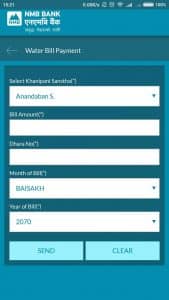
If you want to pay Khanepani or Water utility bills using your bank account, first you need to make sure that the Water bill payment is there or not. Then you need to go to the app or web login to fill in the details for the payment.  Here is a snapshot of the payment through the NMB app. Click to enlarge.

Steps to pay the khanepani bill through NMB bank app:

  • For the NMB bank mobile app, click the payments on the main page of the app.
  • Scroll down to the Water bill payment
  • Select the Water distributing office or Khanepani Sanstha for your location.
  • Enter the bill amount, Dhara No, Bill month and Year
  • Click send to confirm.

How to pay the khanepani bill using eSewa or Khalti?

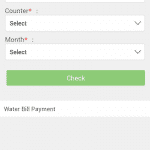
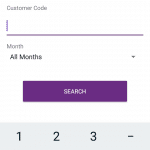
You can also the Water utility/khanepani bills using popular digital or mobile wallets. We try to make it general for both of the apps. Difference between them lies in selecting the different khanepani Sanstha. Khalti has tried to put it in a single interface to select the counter whereas eSewa has different sections for it like the one below. Find Top Mobile wallets and online digital payment providers in Nepal.
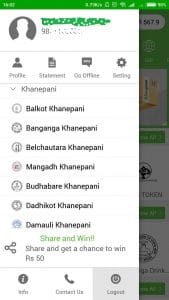
You can do the payment either from website or app. If you are on mobile, then an app is the right choice for you. eSewa does not even let you use the web in mobile now. Here are the steps for the payment.

  • First, make sure you have enough balance in your wallet or top up from the bank account or ask from any friends or family to lend.
  • Then Go to the Khanepani bill payment section in the app or website.
  • Assure of selecting the right khanepani counter or khanepani Sanstha for your location.
  • Then enter your customer ID or customer code
  • You can also select the respective month or the all-time and click search or check.
  • Then you will be prompted with the bill amount to be paid. Click ok and confirm to continue
  • Then your bill payment will be successful.
Don’t forget to read, Top online shopping sites in Nepal.

Follow us on Facebook, Google News, and Viber to get the latest news, and information about Nepal Telecom, Ncell, Smart Cell, ISPs, mobile apps, and phones in Nepal.

Latest Posts

  • Nepal Telecom launches 13 4G/2G sites in Bhadra 2083
  • Trip Turbo Launches Travel Mela 2026: Nepal’s Biggest Travel Sale
  • Nepal Telecom’s relief and telecom services in Bhotekoshi flood-hit areas
  • Ncell partners with NATO to strengthen tourists’ connectivity in Nepal
  • Nepal Telecom Brings Constitution Day 2083 Offer | Sambidhan Diwas
  • Ncell’s 21st anniversary: Two decades of connecting, investing and transforming Nepal
  • Ncell employees contribute Rs 33.50 lakh to PM’s Disaster Relief Fund
Comments
Previous Post

F1 Soft buys Bhatbhateni online shopping: eSewapasal

Next Post

Kamini Rajbhandari to continue as MD of Ntc

NepaliTelecom

NepaliTelecom

Related Posts

Trip Turbo Travel Mela 2026
Digital Nepal

Trip Turbo Launches Travel Mela 2026: Nepal’s Biggest Travel Sale

September 21, 2026
Digital Parliament Nepal
Digital Nepal

Digital Parliament Platform Launched, Find MPs, Meetings, and All Details

September 16, 2026
Daraz 9.9 sale offer
Apps

Daraz 9.9 campaign: Up to 70% discount, free delivery, more

September 8, 2026
Load More

You may also read

Ntc FTTH

Nepal Telecom Fiber Internet: Price, Speed, Offer, Packs [2026]

August 5, 2026
Latest Vianet logo

Vianet Internet Packages in Nepal: Prices, FUP, and ViaTV

August 4, 2026
Ntc Constitution Day Sambidhan diwas offer

Nepal Telecom Brings Constitution Day 2083 Offer | Sambidhan Diwas

September 17, 2026
Digital Parliament Nepal

Digital Parliament Platform Launched, Find MPs, Meetings, and All Details

September 16, 2026
WorldLink logo 2026 latest

WorldLink Internet Packages: Price, Offers, FUP, 2026 update

August 28, 2026
Ntc Namaste Wifi service with 4G LTE router

Namaste Wifi | Ntc’s Wireless Broadband with 4G Router [2026]

June 6, 2026
NepaliTelecom

Nepalitelecom.com is a website/blog which provides information regarding telecommunication in Nepal along with Gadgets and has been doing some research for the telecom market in Nepal. We intend to do more of such survey/research in the Nepalese Telecom sector.

SiteMap

📢 Follow us on Viber to get the latest news, and information about Nepal Telecom, Ncell, ISPs, mobile apps, and phones in Nepal.

Popular Categories

Ntc | Ncell | Telco News | ISP | NTA | Gadgets

Recent Posts

  • Nepal Telecom launches 13 4G/2G sites in Bhadra 2083
  • Trip Turbo Launches Travel Mela 2026: Nepal’s Biggest Travel Sale
  • Nepal Telecom’s relief and telecom services in Bhotekoshi flood-hit areas

© 2026 Nepalitelecom

No Result
View All Result
  • Home
  • Telco News
  • Gadgets Nepal
  • Nepal Telecom
  • Ncell
  • Digital Nepal
  • How To
  • Editors’ Pick

© 2026 Nepalitelecom