
• Ntc
  • Ncell
  • Samsung
  • Apple
  • Xiaomi
  • 2G to 5G
  • ISP
  • NTA
  • Tariffs
  • About us
Saturday, May 30, 2026
NepaliTelecom
  • Home
  • Telecom News
    • News
    • NTA
    • Ntc
    • Ncell
    • Smart Cell
    • Digital Nepal
  • Gadgets
  • How To
  • Editors’ Pick
  • Contact
  • About
No Result
View All Result
  • Home
  • Telecom News
    • News
    • NTA
    • Ntc
    • Ncell
    • Smart Cell
    • Digital Nepal
  • Gadgets
  • How To
  • Editors’ Pick
  • Contact
  • About
No Result
View All Result
NepaliTelecom
No Result
View All Result

Home » Digital Nepal » Fonepay launches Voice Notification to confirm QR payments

Fonepay launches Voice Notification to confirm QR payments

Dinesh by Dinesh
June 3, 2024
in Digital Nepal
Reading Time: 4 mins read
Fonepay Voice Notification launched
Follow us on

Fonepay has unveiled its latest innovation “voice notification” feature which helps to confirm QR payments for merchants and customers. The service is available on Fonepay Business App and merchants can enable it to handle their business transactions on mobile phones seamlessly.

The feature lets merchants verify QR payments through an audio confirmation. The Fonepay Business App issues an audio notification stating that the payment has been received. This rids the need for both merchants to wait for an SMS confirmation for the payment. It saves time and delivers convenience. The feature is available on the Fonepay Business App which needs activation in an easy step (more on that below).

“We understand the challenges faced by merchants in today’s business environment,” said Diwas Kumar, CEO of Fonepay. “With these mobile phone-centric innovations, we are confident that our network partner institutions can empower their merchants with greater flexibility and redefine the QR code-based payment acceptance experience”

Previously, wallets such as eSewa launched an audio device for payment confirmation. However, Fonepay’s solution doesn’t require a separate device and is available through its business app.

Check out: Limit of digital payment in Nepal Mobile, internet banking, QR payment, more [2081]

How to enable Fonepay Voice Notification on the Business App?

These are the steps to activate Voice Notification on the Fonepay Business App:

  • Download and launch the “Fonepay Business App”
  • On the home page, find the “Profile” section
  • Tap “Notification”
  • Turn on the “Voice Notification” feature
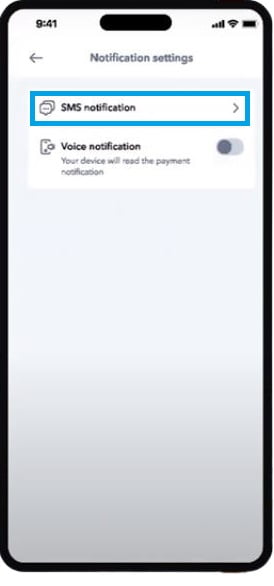
fonepay voice notification
Fonepay Voice Notification feature on the Fonepay Business App

That’s it. After this, every time a Fonepay merchant has a business transaction, a real-time voice notification is instantly issued by the app.

Also read: Fonepay Credit Card: A new benchmark set in the Fintech industry

The feature elevates the QR payment experience for Fonepay merchants

QR payment has revolutionized the payment landscape. It’s one of the drivers of the digital economy and a key ingredient for cashless payment. However, for regular consumers, it’s a major inconvenience to wait for payment confirmation after making the payment via digital wallets (e-wallets) or mobile banking apps. Merchants and customers both need to wait to verify that the business transaction is complete. Thankfully, Fonepay has brought its voice notification feature which will amply eliminate this shortcoming.

Fonepay Voice Notification issues clear and audible voice alerts after payment via Fonepay QR confirming the transaction for both the merchants and the customers

Available on the Fonepay Business App, the users can now escape worries about payment verification and instead focus solely on handling their business operations. They won’t need to continuously check up on SMS notifications on their phones for payment. They get clear and audible voice alerts for payments which guarantees that they won’t ever miss important transaction updates.

Fonepay is Nepal’s leading payment system operator with over 80% market share. The digital payment facilitator is available through mobile wallets and mobile banking apps. It’s also one of the most used payment operator used by Nepalese smartphone users. Its latest innovation enhances merchants’ experience with payment verification, a much-needed and waited feature in the market.

Check out: Most popular smartphone apps in Nepal [2024]

Do you think the voice notification feature of Fonepay will amplify its usefulness among merchants? Do you have any suggestions to improve the user experience? You can share in our comment section below or find us on our social media handles.


Follow us on Facebook, Google News, and Viber to get the latest news, and information about Nepal Telecom, Ncell, Smart Cell, ISPs, mobile apps, and phones in Nepal.

Latest Posts

  • Highlights from Budget speech FY 2083/84 on telecom and digital priorities
  • Govt. to increase public ownership in Ntc, reducing own share to 66%
  • Xiaomi 17T launched in Nepal with 5X periscope lens and Dimensity 8500 Ultra
  • Pathao Nepal launches helicopter booking, trip to Muktinath, EBC
  • Huawei Nepal Hosts Mini MWC 2026 with Nepal’s Operators
  • Ncell bags ISO 9001 and ISO 14001 certifications
  • NTC Republic Day Offer 2083: 5GB/Day at Rs 499 | Nepal
Comments
Previous Post

Government amends directives on appointment & facility of Ntc Managing Director (MD)

Next Post

MoCIT announces vacancy for the Nepal Telecom MD post 2081

Dinesh

Dinesh

Senior Editor; An experienced tech writer covering news mostly on telecommunication, internet, latest tech & trends, and Gadgets. Being a technophile, I am particularly fascinated by the evolution of mobile networks in Nepal from legacy networks (2G, 3G) to 4G (with VoLTE, VoWiFi, eSIM) and the prospects of the upcoming 5G, and equally enthralled by the development of internet from the dial-up connection to the 2 Gbps XGS-PON fiber broadband technology and their transformative impact in the country.

Related Posts

Pathao helicopter booking in Nepal
Apps

Pathao Nepal launches helicopter booking, trip to Muktinath, EBC

May 28, 2026
MoFA Mitra app service
Apps

Govt. launches MoFA Mitra app for consular services

May 26, 2026
Best VPN in Nepal
Digital Nepal

Best VPN in Nepal 2026: 7 Top Picks for Privacy & Streaming

May 24, 2026
Load More

You may also read

Ntc FTTH

Nepal Telecom Fiber Internet: Price, Speed, Offer, Packs [2026]

May 9, 2026
Budget speech FY 2083 84 IT Telecom

Highlights from Budget speech FY 2083/84 on telecom and digital priorities

May 30, 2026
Nepal Telecom Ntc customer care numbers

Ntc Customer Care Number for Complain & Info Query [2026]

February 5, 2026
Nepal Telecom Ntc eSIM

How to Activate Ntc eSIM? Upgrade or New [2026 Update]

May 19, 2026
How to check SEE Result 2082 online Nepal

How to Check SEE Result 2082 Online: NTC, SMS, Websites & Marksheet Guide

May 11, 2026
how to check Ntc Ncell SIM owner name change Nepal 2026

How to Check & Change Ntc, Ncell SIM Owner Name [2026 Updated Guide]

May 25, 2026
NepaliTelecom

Nepalitelecom.com is a website/blog which provides information regarding telecommunication in Nepal along with Gadgets and has been doing some research for the telecom market in Nepal. We intend to do more of such survey/research in the Nepalese Telecom sector.

SiteMap

📢 Follow us on Viber to get the latest news, and information about Nepal Telecom, Ncell, ISPs, mobile apps, and phones in Nepal.

Popular Categories

Ntc | Ncell | Telco News | ISP | NTA | Gadgets

Recent Posts

  • Highlights from Budget speech FY 2083/84 on telecom and digital priorities
  • Govt. to increase public ownership in Ntc, reducing own share to 66%
  • Xiaomi 17T launched in Nepal with 5X periscope lens and Dimensity 8500 Ultra

© 2026 Nepalitelecom

No Result
View All Result
  • Home
  • Telco News
  • Gadgets Nepal
  • Nepal Telecom
  • Ncell
  • Digital Nepal
  • How To
  • Editors’ Pick

© 2026 Nepalitelecom