• Ntc
  • Ncell
  • Samsung
  • Apple
  • Xiaomi
  • 2G to 5G
  • ISP
  • NTA
  • Tariffs
  • About us
Friday, August 7, 2026
NepaliTelecom
  • Home
  • Telecom News
    • News
    • NTA
    • Ntc
    • Ncell
    • Smart Cell
    • Digital Nepal
  • Gadgets
  • How To
  • SpeedTest
  • Contact
  • About
No Result
View All Result
  • Home
  • Telecom News
    • News
    • NTA
    • Ntc
    • Ncell
    • Smart Cell
    • Digital Nepal
  • Gadgets
  • How To
  • SpeedTest
  • Contact
  • About
No Result
View All Result
NepaliTelecom
No Result
View All Result

Home » Tech News » Google Maps Showing Live Traffic Status & Busy Areas in Nepal

Google Maps Showing Live Traffic Status & Busy Areas in Nepal

Mintu Awal by Mintu Awal
December 21, 2022
in Tech News
Reading Time: 4 mins read
Google Maps Showing Live Traffic Status & Busy Areas in Nepal
Follow us on

Last Updated on December 21, 2022

Google Maps have started showing Live Traffic and Busy Areas of the cities in Nepal. The pioneer map company has finally implemented this helpful feature into its app for Nepalese users. However, this feature is not new and was already available on the maps since 2007. Let’s know more about this in our article today.

Google Maps Showing Live Traffic in Nepal

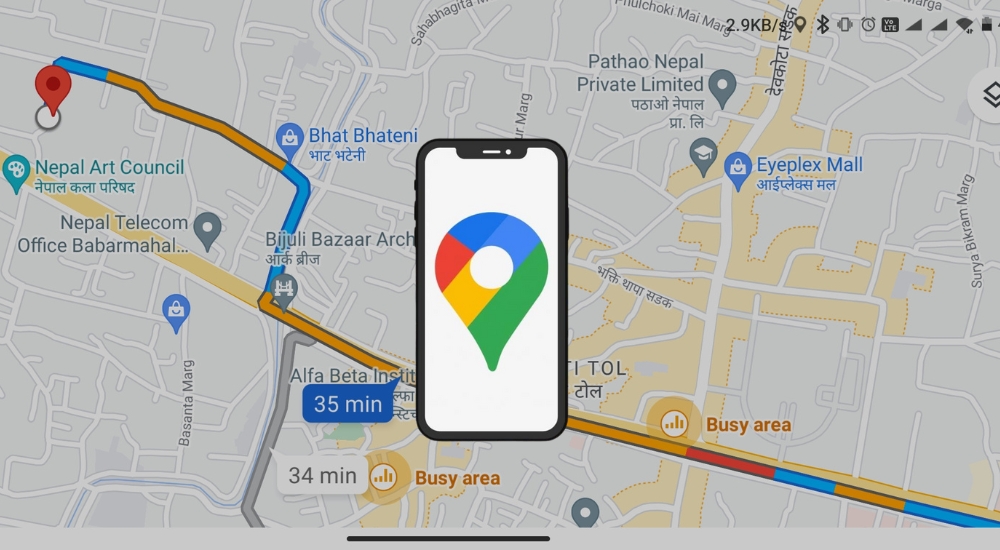
With a new update, Google has pushed the feature for users in Nepal. Now, the app can show busy area with traffics on the maps. When the user selects a specific destination on Google Maps and starts navigation, information about the road traffic conditions is displayed. It is showcased in three colors; blue, yellow, and red.

The blue color denotes that there is no traffic jam and the road is clear. While the yellow color shows that the road is busy with a higher number of vehicles and some traffic. Likewise, the red color depicts a traffic jam on the road. Not only on city roads but Google Maps is now also showing the traffic conditions on the main highways as well.

Google Maps Showing Live Traffic in Nepal

For viewing the Live traffic status, one should set a specific destination, and turn on the navigation. Then, the map will show the status via the aforementioned colors. This will help the commuters as well as riders to seek a way with fewer traffic jams.

Do Read:- How to watch Football World Cup in Nepal? Find All Fixtures

How Does Live Traffic Work on Google Maps?

The Google Maps app users whose location has been set to “on” are the source of the data used by Google Traffic. Google’s users who share their geographic location with the app provide data about the current traffic conditions on any given road or highway. By initially gathering data from them, Google is able to give real-time traffic updates to all of its Maps app users.

Google has a special built-in feature called Google Traffic on its Maps app that shows traffic conditions in real time on major roads in particular geographic locations. It also tracks and notices the pattern of the movement of the vehicle on the road with Artificial Intelligence (AI).

Also Read:- Google Discontinues ‘Translate’ Service in Mainland China

Benefits of Live Traffic on Google Maps

Traffic congestion has become a problem as well as part of our daily lives. Reaching somewhere on time requires you to leave your home early. The growing number of vehicles and commuters on the road often makes it harder on city roads. Hence, the Live Traffic feature of Google Maps comes really handy here.

Google Maps
Google Maps

Users can just set their destination and turn on the navigation. And the Maps will show busy areas with traffic status on the road. It will assist in time management and seeking a quicker path with no traffic. Not only for city roads, but this will also hugely assist highways too. As highways are subject to larger traffic jams and roadblocks, users can get an idea about traffic status while traveling. It works to provide data on the traffic situation of the roads in any area, which can be used to know the amount of delay of the trip in this area.

The new feature will be very helpful for those traveling in high-traffic areas. It has already gone live on the official app.

Also. Read:- Google to roll out Clear Calling feature on Android 13

So, what do you think of this new feature? Have you tried it yet? Make sure, you update the app and try the feature. And also, drop your views, thoughts, and queries in the comment section below.


Follow us on Facebook, Google News, and Viber to get the latest news, and information about Nepal Telecom, Ncell, Smart Cell, ISPs, mobile apps, and phones in Nepal.

Latest Posts

  • Kushal Bhurtel becomes brand ambassador of Nepal Telecom
  • Xiaomi Watch S5 46mm Launched in Nepal with up to 21-day battery life
  • ISPs that don’t pay fees can’t operate services- Comm. Minister Timilsina
  • Nepal Telecom offers discount on payment clearance till FY 080/81
  • Ncell Monsoon Offer: Up to 20% Cashback on purchasing a pack
  • WorldLink Pays NEA Pole Rental Dues, Other ISPs Yet to Clear
  • Nepalis in Hilsa are forced to use Chinese SIMS at a high price
Comments
Previous Post

Nepal Telecom Awarded as the Highest-Tax Paying Company for FY 77/78

Next Post

ICT Award 2022 Announces Top 5 Startups, Products, and Innovations; Public Voting on Friday

Mintu Awal

Mintu Awal

A weird techno guy who dwells inside his own world of thoughts resembling Life, Karma, Tech, Gadgets, Astrology & Spirituality. Loves to contemplate and daydream about owning every newly launched gadget. Thinking Beyond and Sinking Deep in the sea of this threshold known as 'Human Life'.

Related Posts

iOS 26.6
Apps

iOS 26.6 released with Spotlight improvement; how to download it?

July 29, 2026
Meta Facebook Verified Badge for free
Tech News

Meta launches ‘Facebook Verified’ badge for free, how to get it?

July 26, 2026
Huawei FusionSolar9.0 Smart PV Solution and LUTERRA Utility Grid Forming ESS
Tech News

Huawei launches FusionSolar9.0 Smart PV Solution and LUTERRA Utility Grid Forming ESS in Nepal

July 22, 2026
Load More

You may also read

Ntc FTTH

Nepal Telecom Fiber Internet: Price, Speed, Offer, Packs [2026]

August 5, 2026
how to check Ntc Ncell SIM owner name change Nepal 2026

How to Check & Change Ntc, Ncell SIM Owner Name [2026 Update]

June 24, 2026
Latest Vianet logo

Vianet Internet Packages in Nepal: Prices, FUP, and ViaTV

August 4, 2026
Nepal Taxpayer Gift program Luckydraw Win Rs 1 to 10 lakh

Govt’s taxpayer gift program begins: Rs 1 lakh a day, million a month: How to participate?

August 6, 2026
New WorldLink logo

WorldLink Internet Packages: Price, Offers, FUP, 2026 update

June 12, 2026
CG Net Price in Nepal

CG Net Internet Packages Price, Speed, FUP, Availability | 2026

May 4, 2026
NepaliTelecom

Nepalitelecom.com is a website/blog which provides information regarding telecommunication in Nepal along with Gadgets and has been doing some research for the telecom market in Nepal. We intend to do more of such survey/research in the Nepalese Telecom sector.

SiteMap

📢 Follow us on Viber to get the latest news, and information about Nepal Telecom, Ncell, ISPs, mobile apps, and phones in Nepal.

Popular Categories

Ntc | Ncell | Telco News | ISP | NTA | Gadgets

Recent Posts

  • Kushal Bhurtel becomes brand ambassador of Nepal Telecom
  • Xiaomi Watch S5 46mm Launched in Nepal with up to 21-day battery life
  • ISPs that don’t pay fees can’t operate services- Comm. Minister Timilsina

© 2026 Nepalitelecom

No Result
View All Result
  • Home
  • Telco News
  • Gadgets Nepal
  • Nepal Telecom
  • Ncell
  • Digital Nepal
  • How To
  • Editors’ Pick

© 2026 Nepalitelecom