
• Ntc
  • Ncell
  • Samsung
  • Apple
  • Xiaomi
  • 2G to 5G
  • ISP
  • NTA
  • Tariffs
  • About us
Wednesday, March 4, 2026
NepaliTelecom
  • Home
  • Telecom News
    • News
    • NTA
    • Ntc
    • Ncell
    • Smart Cell
    • Digital Nepal
  • Gadgets
  • How To
  • Editors’ Pick
  • Contact
  • About
No Result
View All Result
  • Home
  • Telecom News
    • News
    • NTA
    • Ntc
    • Ncell
    • Smart Cell
    • Digital Nepal
  • Gadgets
  • How To
  • Editors’ Pick
  • Contact
  • About
No Result
View All Result
NepaliTelecom
No Result
View All Result

Easiest ways to find election 2082 candidate list, polls station online

Dinesh by Dinesh
March 4, 2026
in Digital Nepal, How To
Reading Time: 6 mins read
Summary✨
  • The election of 2082 is right upon us..
  • Nepalese will vote on Falgun 21, 2082, to choose the new members at the House of Representatives (HoR)..
  • And if you haven’t yet figured out who you might vote for, this post gives you the easiest ways to find out.

The election of 2082 is right upon us. Nepalese will vote on Falgun 21, 2082, to choose the new members at the House of Representatives (HoR). And if you haven’t yet figured out who you might vote for, this post gives you the easiest ways to find out the candidates in 165 different constituencies.

A few facts to begin with. The upcoming election is being conducted for the HoR (Lower House) in Nepal’s bicameral parliament system. Through this election, 165 candidates will be elected through the First-Past-The-Post (FPTP) system, while 110 will be selected from the proportional representation system. In total, 275 members will be selected for the new HoR.

The government allowed voter ID registration using the National ID, which has likely increased the number of voters. You can check the voter ID list details and the polling station online, too.

Table of contents

  • How to find the Election 2082 candidates?
    • Election Commission website
    • Online portals
    • Social media, radio, TV
  • How to find your polling station?
    • Via the Election Commission website
    • Through the Nagarik App
  • Conclusion

Now, to the main part.

How to find the Election 2082 candidates?

Election Commission website

  • Visit https://election.gov.np/np or directly go to https://result.election.gov.np/
  • Now, click on the rows and select your Province, District, and Constituency number
  • You can now find the names of the candidates who are standing in the election
  • You can also break it down further and type Gender, Political Party/Independent, and election symbols to find out your candidates.
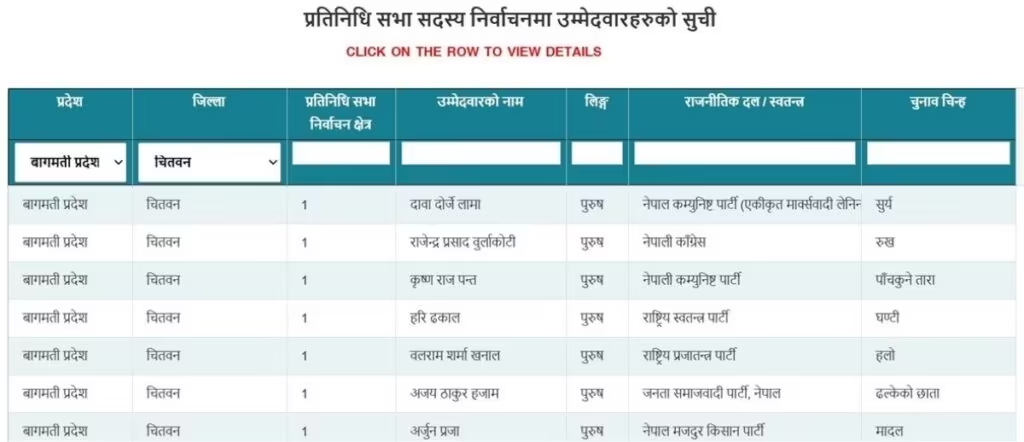
How to find election candidates 2082

Online portals

You can also visit dedicated portals from news outlets such as https://election.ekantipur.com/ or https://election.onlinekhabar.com/candidate-list to find out the candidates of different constituencies. On these portals too, you need to select your province, district, and constituency. Then, you will find out the candidates running for a seat in the HoR past the election 2082/2026.
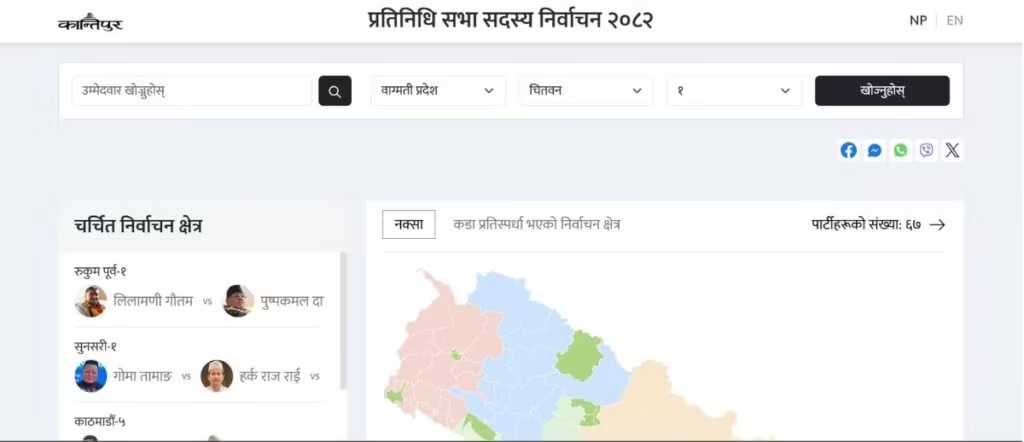
check election candidates 2082 online

Social media, radio, TV

You can also check out political parties’ official social media handles (such as on Facebook, X, Instagram, etc.) where they mention candidates and constituencies. You can also directly search for candidates’ names and check their recent updates to get information on the constituency.

There are also some mobile apps like Vote Nepal, which provide the directory of election candidates in 2026.

You can also find the sample of ballot papers of all seven provinces from here, election.gov.np/np/page/bsatavaka-matapataraka-namana. This can help you cast votes easily, particularly if you are a first-time voter.

How to find your polling station?

You can find your polling station in essentially two ways. Let’s talk about them each at a time.

Via the Election Commission website

Follow the steps to find your polling station on the Election Commission website:

  • Go to oterlist.election.gov.np
  • Fill in the details
  • Now, click on voter details to view
  • Enter either your date of birth or your citizenship number and click on the ‘I’m not a robot’ field and SUBMIT
  • Now, tap on Check your Voting Center (Matadan Kendra)
  • You will see your polling station on Google Maps in a new tab

Through the Nagarik App

You can find your voting center on the Nagarik App using the steps below:

  • Open the Nagarik App
  • Tap on Voter ID
  • Tap on ‘View Polling Center in Map’
  • Google Maps will open, showing you your polling station

This election, 2082, Galli Maps also show your voting center. You need to download the app and check out the option to find the way to your polling station.

Conclusion

The post provides the easiest ways you can check out the names of the candidates who are standing in this election. If you didn’t know the candidates from your constituency or those from areas of your concern, this post is very helpful for you. Besides, Jhapa 5 is a hot topic at the moment.

Thankfully, the election commission is working just fine at the time of writing this article. Due to the heavy load, it is not always working and has drawn criticism for this, too. We hope the authority improves its state soon, as it is one of the best ways to get the election result in Nepal.

Takeaway: Around 20 million citizens are going to vote in the election of 2082. It will have around 800,000 first-time voters. We need to thank the government for allowing online voting registration through NID for it as well. The voting begins at 07:00 AM and ends at 17:00 PM.

We hope this article has been very hopeful. For further queries, do let us know in the comments below. If you are having any issues or need information regarding the Voter ID stuff on Nagarik App as well, feel free to share down below.

Follow us on Facebook, Twitter, and Viber to get the latest news, and information about Nepal Telecom, Ncell, Smart Cell, ISPs, mobile apps, and phones in Nepal.

Latest Posts

  • Huawei connects 170 million people via Partner2Connect Digital Coalition
  • iPad Air 2026 launched with M4 chipset, 12 GB RAM, WiFi 7
  • Sparrow SMS launches Keyword Block System to filter election messages in Silence Period
  • Xiaomi Pad 8 launched with 3.2K display, Snapdragon 8s Gen 4
  • iPhone 17e launched with A19 chip, 256 GB base storage
  • Xiaomi 17 launched with 6.3″ display, 6330mAh battery
  • Xiaomi 17 Ultra launched with 6.9-inch display, Leica cameras
Comments
Previous Post

Ntc updates Group SMS | Send a message to 10 thousand users

Next Post

Nepal Telecom starts election CRBT to raise awareness

Dinesh

Dinesh

An experienced tech writer covering news mostly on telecommunication, internet, latest tech & trends, and Gadgets. Being a technophile, I am particularly fascinated by the evolution of mobile networks in Nepal from legacy networks (2G, 3G) to 4G (with VoLTE, VoWiFi, eSIM) and the prospects of the upcoming 5G, and equally enthralled by the development of internet from the dial-up connection to the 2 Gbps XGS-PON fiber broadband technology and their transformative impact in the country.

Related Posts

Sparrow Voice Message
Digital Nepal

Sparrow SMS launches Keyword Block System to filter election messages in Silence Period

March 3, 2026
Nagarik Adhikar app
Apps

Nagarik App big update: Allows screenshot of voter ID

February 21, 2026
CPN UML manifesto on internet and connectivity 2082
Digital Nepal

CPN-UML announces: 10 GB data for free for a year

February 19, 2026
Load More

Leave a Reply Cancel reply

Your email address will not be published. Required fields are marked *

You may also read

Check voter list online Election commission Nepal

How to check voter ID list details online? Election Commission

March 1, 2026
Ntc FTTH

Nepal Telecom Fiber Internet: Price, Speed, Offer, Packs [2026]

February 5, 2026

Easiest ways to find election 2082 candidate list, polls station online

March 4, 2026
how to check Ntc Ncell number owner name and transfer ownership

How to check Ntc, Ncell number owner name & Transfer

February 12, 2026
How to register Voter ID with National ID card NID in Nepal

Register your Voter ID with National ID card

March 1, 2026
Nepal Telecom Ntc eSIM

How to Activate Ntc eSIM? Upgrade or New [2026 Update]

February 7, 2026
NepaliTelecom

Nepalitelecom.com is a website/blog which provides information regarding telecommunication in Nepal along with Gadgets and has been doing some research for the telecom market in Nepal. We intend to do more of such survey/research in the Nepalese Telecom sector.

SiteMap

📢 Follow us on Viber to get the latest news, and information about Nepal Telecom, Ncell, ISPs, mobile apps, and phones in Nepal.

Popular Categories

Ntc | Ncell | Telco News | ISP | NTA | Gadgets

Recent Posts

  • Huawei connects 170 million people via Partner2Connect Digital Coalition
  • iPad Air 2026 launched with M4 chipset, 12 GB RAM, WiFi 7
  • Sparrow SMS launches Keyword Block System to filter election messages in Silence Period

© 2025 Nepalitelecom

No Result
View All Result
  • Home
  • Telco News
  • Gadgets Nepal
  • Nepal Telecom
  • Ncell
  • Digital Nepal
  • How To
  • Editors’ Pick

© 2025 Nepalitelecom