• Ntc
  • Ncell
  • Samsung
  • Apple
  • Xiaomi
  • 2G to 5G
  • ISP
  • NTA
  • Tariffs
  • About us
Wednesday, January 14, 2026
NepaliTelecom
  • Home
  • Telecom News
    • News
    • NTA
    • Ntc
    • Ncell
    • Smart Cell
    • Digital Nepal
  • Gadgets
  • How To
  • Editors’ Pick
  • Contact
  • About
No Result
View All Result
  • Home
  • Telecom News
    • News
    • NTA
    • Ntc
    • Ncell
    • Smart Cell
    • Digital Nepal
  • Gadgets
  • How To
  • Editors’ Pick
  • Contact
  • About
No Result
View All Result
NepaliTelecom
No Result
View All Result

How to configure your handset for GPRS(2G)/3G/4G in NTC.

NepaliTelecom by NepaliTelecom
April 14, 2025
in How To
Reading Time: 4 mins read
GPRS ntc configuration

We have been writing posts about Nepal Telecom’s data packs and internet registration procedure. But people are also regularly asking about the process for data configuration in GPRS(2G)/3G/4G. NTC started GPRS service in 2009 and then added 3G and 4G service later.

NTC GPRS configuration process has changed from manual to SMS query. Still, people are confused about the process. So, we are here to provide information on how to configure GPRS to 4G data in Ntc GSM mobile.

Find the latest data packs in Ntc SIM.

Table of contents

  • How to subscribe data service?
  • Process for Ntc GPRS configuration
    • Ntc MMS settings

How to subscribe data service?

If a customer wants to use NT GPRS/3G or 4G service in their GSM mobile, they should first confirm the registration of their SIM for GPRS/ 3G. These days, the data service comes as a default. But if there is any issue, People can register easily by

  • sending a message VGPRS or 3G to 1415.

To subscribe 3G in Ntc, you need to

  • send a message 3G to 1415.

Similarly, for 4G, customer need to

  • dial *444# and select 1

Read more: How to activate and put 4G in your phone.

Process for Ntc GPRS configuration

After the registration, the subscriber needs to configure their handset for GPRS service (which is the same for 3G or even 4G in GSM mobile) as below.

  • You can simply add the access point by going to Settings-> Mobile networks or Cellular Networks -> Access point name.
  • put the name as “ntc” and APN as “ntnet”
  • you have to save it and
  • use it as default by selecting it.

Ntc MMS settings

  • For MMS settings in Ntc, you have to put the following.
    MMS APN: ntmms
    MMS home page/server address: 192.80.11.180

Earlier they used to provide another APN named “ntwap” with some ports and proxy information. Now after the upgrade of Ntc core system, they request all people to use “Ntnet” as the APN as stated above in the process.

These days, NT also sends a message to a customer from 1408, once he/she switches on after putting the new SIM card. In the message, NT has asked to put “ntnet” as an access point name. You will also be informed about this if you take out the SIM for any reason.

Here is the format of the message: “Dear Customer, To activate NTC internet service, please add a new configuration named ‘ntnet’ for GPRS, set access point name as ntnet, set home page as ‘http://www.ntc.net.np’, you can enjoy the GPRS service”.

Also Read this: Easy Ntc GPRS settings or configuration.

Well, you can name the access point as NTC or any other name, but the app should be ‘ntnet’ without the inverted. See the picture below for what to do after you go to settings-> mobile networks -> Access point names. Add new.
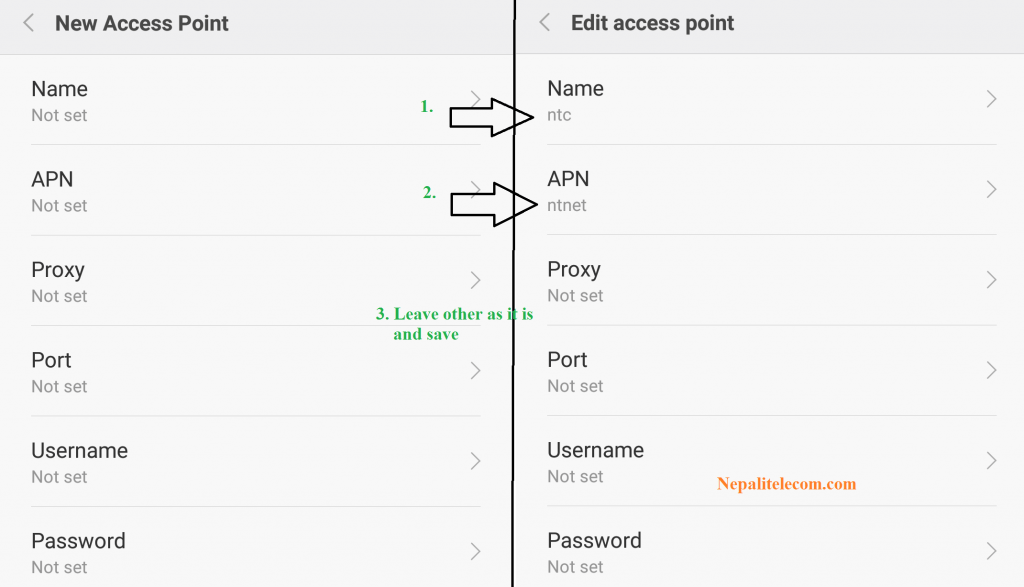
GPRS Settings Nepal Telecom Ntc

We suggest you to follow the steps in the article for best way to use mobile data.

Tell us what do you think of the NTC mobile internet GPRS configuration? If you have any queries, do feedback us in the comment below or through our Facebook page.


Follow us on Facebook, Twitter, and Viber to get the latest news, and information about Nepal Telecom, Ncell, Smart Cell, ISPs, mobile apps, and phones in Nepal.

Latest Posts

  • Ncell Reassures Data Privacy As Political Texts Trigger Fear
  • Nepal Telecom hosts 18th AGM, Major projects coming!
  • Nepal Telecom migrating data to a new SMSC system, SMS disturbance!
  • Nepal Telecom releases statement on political ‘VAS’ messages
  • Apple seeks Gemini AI help for customized Siri experience
  • Nepali students made Munal satellite launch ‘failed’, latest setback for ISRO
  • Phone price will increase in 2026, due to chipset and RAM cost hike
Comments
Previous Post

Ncell to send SMS alert for flood and landslides

Next Post

Huawei P9 launched in Nepal

NepaliTelecom

NepaliTelecom

Related Posts

How to add favorite news source to Top stories Google
How To

How to add your favorite news source in Top Stories, Google

January 11, 2026
How to improve Wifi coverage and Fix WiFi dead zones
How To

How to Improve WiFi Coverage & Fix Those Annoying Dead Zones

November 12, 2025
How to make the most of Daraz 11.11 Sale 2025 in Nepal
How To

How to Make the Most of Daraz 11.11 2025? Find 10 Best Tips

November 11, 2025
Load More

You may also read

IPO results Mero share

Now You Can View IPO Results Immediately | CDSC Improves System

November 13, 2021
Ntc FTTH

Nepal Telecom Fiber Internet: Price, Speed, Offer, Packs [2026]

January 7, 2026
how to check Ntc Ncell number owner name and transfer ownership

How to check Ntc, Ncell number owner name & Transfer Ownership

October 19, 2025
Ntc KYC update on phone

Nepal Telecom now lets you update KYC online on your phone

January 11, 2026
Nepal Telecom Ntc customer care numbers

Ntc Customer Care Number for Complain & Info Query [2025]

September 23, 2025
Mero Share login

Mero Share: How To Apply for Share (IPO) Online in Nepal?

December 24, 2023
NepaliTelecom

Nepalitelecom.com is a website/blog which provides information regarding telecommunication in Nepal along with Gadgets and has been doing some research for the telecom market in Nepal. We intend to do more of such survey/research in the Nepalese Telecom sector.

SiteMap

📢 Follow us on Viber to get the latest news, and information about Nepal Telecom, Ncell, ISPs, mobile apps, and phones in Nepal.

Popular Categories

Ntc | Ncell | Telco News | ISP | NTA | Gadgets

Recent Posts

  • Ncell Reassures Data Privacy As Political Texts Trigger Fear
  • Nepal Telecom hosts 18th AGM, Major projects coming!
  • Nepal Telecom migrating data to a new SMSC system, SMS disturbance!

© 2025 Nepalitelecom

No Result
View All Result
  • Home
  • Telco News
  • Gadgets Nepal
  • Nepal Telecom
  • Ncell
  • Digital Nepal
  • How To
  • Editors’ Pick

© 2025 Nepalitelecom