• Ntc
  • Ncell
  • Samsung
  • Apple
  • Xiaomi
  • 2G to 5G
  • ISP
  • NTA
  • Tariffs
  • About us
Wednesday, March 11, 2026
NepaliTelecom
  • Home
  • Telecom News
    • News
    • NTA
    • Ntc
    • Ncell
    • Smart Cell
    • Digital Nepal
  • Gadgets
  • How To
  • Editors’ Pick
  • Contact
  • About
No Result
View All Result
  • Home
  • Telecom News
    • News
    • NTA
    • Ntc
    • Ncell
    • Smart Cell
    • Digital Nepal
  • Gadgets
  • How To
  • Editors’ Pick
  • Contact
  • About
No Result
View All Result
NepaliTelecom
No Result
View All Result

How to add your favorite news source in Top Stories, Google

Dinesh by Dinesh
January 11, 2026
in How To, Tech News
Reading Time: 3 mins read
How to add favorite news source to Top stories Google

Google has rolled out a feature that lets you add your favorite internet news sources to Top Stories in Search. It allows you to stay up to date with your favorite topics on the go from the sources you prefer.

The option to choose users’ preferred source helps them connect with the sites they frequently read and not miss the current developments.

“Once you select your sources, they will appear more frequently in Top Stories or in a dedicated ‘From your sources’ section on the search results page. You’ll still see content from other sites, and can manage your selections at any time,” Google said recently.

So, when you choose your sources, you get their articles more often in Top Stories. If you are unaware, when you search for a new development, Google shows you content in Top Stores. This will show you your search results from the site you choose.

Check out: Most popular apps in Nepal | Wallet to entertainment

Steps to add NepaliTelecom.com in Top Stories in Google Search:

Here are the steps to get your fresh content from NepaliTelecom.com in the Top Stories section in Google Search:

  • Open Chrome and search for a topic that’s trending at the moment
  • Tap on the icon that’s to the right of Top Stories
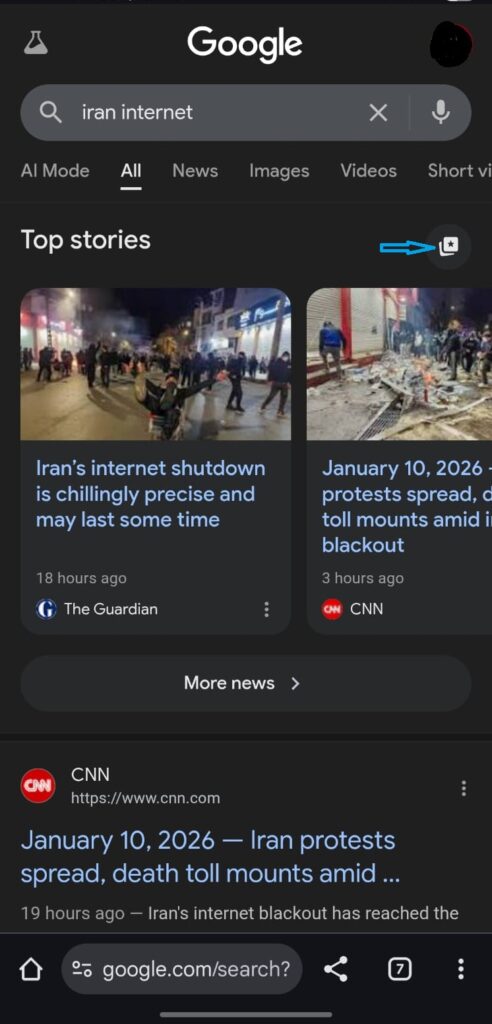
How to select preferred source in top stories in google search
  • In a field, type NepaliTelecom.com and check the box to select it as your preferred source
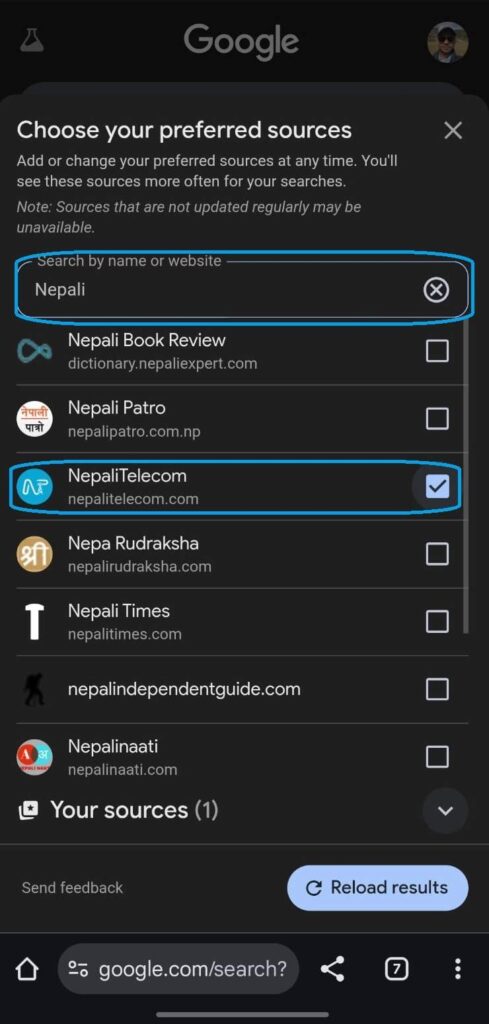
  • Refresh your results, and you get to see more content from the site

What you get with it?

By adding NepaliTelecom.com to your preferred source list for Google’s Top Stories, you get fresh content from us in your Google search. This includes all the important and latest developments in the telecom industry in Nepal, new services from telcos, smartphone launches, tech news, etc. We are proud to mention that we are the No. 1 credible source of Telecom information of Nepal.

You can choose as many sites as you prefer. Research has found that a user can choose an average of four sites as their preferred source for news.

You can follow a similar method to add other sites to your source list.

  • How to check your voter ID online?

Follow us on Facebook, Twitter, and Viber to get the latest news, and information about Nepal Telecom, Ncell, Smart Cell, ISPs, mobile apps, and phones in Nepal.

Latest Posts

  • Latest fiber users report 2082: WorldLink, Dish Home top
  • 4G users in Nepal: 2.64 crores | Latest NTC, Ncell figures
  • Nothing Phone (4a) launched with a new Glyph bar
  • Samsung Galaxy S26 Ultra opens for pre-booking in Nepal
  • Samsung Galaxy S26+, S26 available for pre-booking in Nepal with discount
  • Samsung Galaxy S26 Series Pre-booking Opens in Nepal
  • Nothing Phone (4a) Pro launched with fresh design, 5080mAh battery
Comments
Previous Post

Nepal Telecom’s FTTH and BTS affected in Pokhara, service restoration work ongoing

Next Post

Apple iPhone Price in Nepal | Latest update Feb. 2026

Dinesh

Dinesh

An experienced tech writer covering news mostly on telecommunication, internet, latest tech & trends, and Gadgets. Being a technophile, I am particularly fascinated by the evolution of mobile networks in Nepal from legacy networks (2G, 3G) to 4G (with VoLTE, VoWiFi, eSIM) and the prospects of the upcoming 5G, and equally enthralled by the development of internet from the dial-up connection to the 2 Gbps XGS-PON fiber broadband technology and their transformative impact in the country.

Related Posts

Vibe coding on Samsung smartphones
Tech News

Samsung plans to make its smartphones vibe coding beasts

March 7, 2026
Huawei Yang Chaobin on ITU Partner2Connect Pledge Target
Tech News

Huawei connects 170 million people via Partner2Connect Digital Coalition

March 4, 2026
Digital Nepal

Easiest ways to find election 2082 candidate list, polls station online

March 4, 2026
Load More

Leave a Reply Cancel reply

Your email address will not be published. Required fields are marked *

You may also read

Check voter list online Election commission Nepal

How to check voter ID list details online? Election Commission

March 1, 2026

Easiest ways to find election 2082 candidate list, polls station online

March 4, 2026
Ntc FTTH

Nepal Telecom Fiber Internet: Price, Speed, Offer, Packs [2026]

March 9, 2026
how to check Ntc Ncell number owner name and transfer ownership

How to check Ntc, Ncell number owner name & Transfer

February 12, 2026
Nepal Telecom Ntc eSIM

How to Activate Ntc eSIM? Upgrade or New [2026 Update]

March 9, 2026

How To Watch Nepali TV Channels Online from Nepal/Abroad?

November 17, 2025
NepaliTelecom

Nepalitelecom.com is a website/blog which provides information regarding telecommunication in Nepal along with Gadgets and has been doing some research for the telecom market in Nepal. We intend to do more of such survey/research in the Nepalese Telecom sector.

SiteMap

📢 Follow us on Viber to get the latest news, and information about Nepal Telecom, Ncell, ISPs, mobile apps, and phones in Nepal.

Popular Categories

Ntc | Ncell | Telco News | ISP | NTA | Gadgets

Recent Posts

  • Latest fiber users report 2082: WorldLink, Dish Home top
  • 4G users in Nepal: 2.64 crores | Latest NTC, Ncell figures
  • Nothing Phone (4a) launched with a new Glyph bar

© 2025 Nepalitelecom

No Result
View All Result
  • Home
  • Telco News
  • Gadgets Nepal
  • Nepal Telecom
  • Ncell
  • Digital Nepal
  • How To
  • Editors’ Pick

© 2025 Nepalitelecom