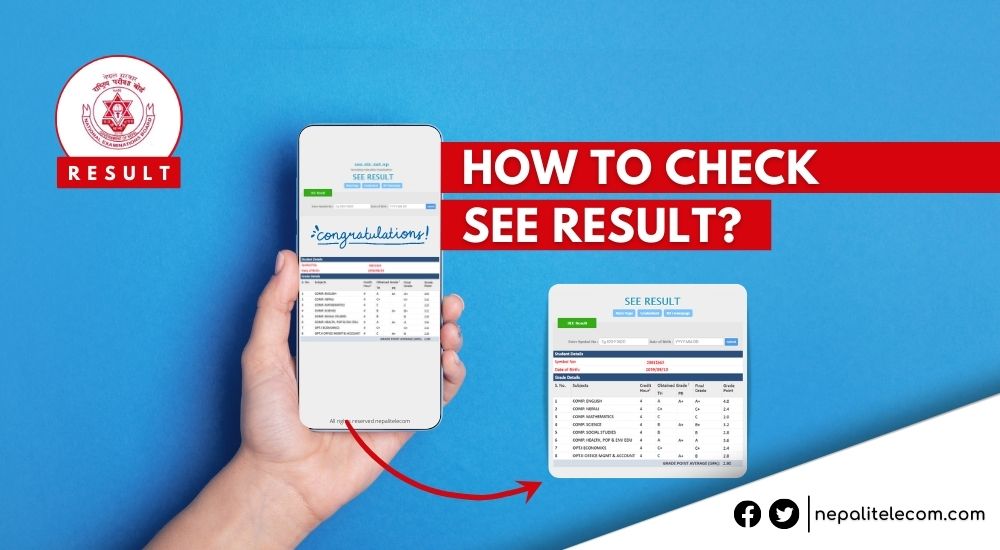
The SEE Result 2082 has been published today (Baishak 28, 2083) by NEB and is available on all platforms.
Check SEE Result 2082 using options like NTC’s IVR, SMS, and several official websites and apps like eSewa and Khalti.
Over 512,000 students participated, and the new Non-Graded (NG) system penalizes those scoring below 35%.
To access results, remember your symbol number and registered date of birth, as they are required for verification.
In case of heavy traffic, users may encounter delays; however, alternative methods like SMS can be faster.
The SEE Result 2082 has been published. The National Examination Board (NEB) has released the SEE Result 2082 and now available on all platforms. In this guide, we cover every method to check your SEE Result 2082 online — including the NTC website, SMS shortcodes, IVR call, eSewa, Khalti apps, and all official portals — along with how to download your marksheet with GPA scores/Grades.
📅 SEE Result 2082 Published by NEB. Find the processes to check the results and don’t forget to follow us.
SEE results are published every year, and there are several methods to view the results here in Nepal. The result providers range from telecom company portals, Value-added service providers, Government official portals, Office of the Controller of Examinations websites, Online news portals, education portals, etc. And this is the first time that NEB will publish the results within one month after the exam.
The best part is you can also view the grades and mark sheet along with the results by entering the examinee’s date of birth that you have registered with on your SEE admit card. This post includes all of the processes (including SMS, Ntc IVR calls, and Websites) to view the SEE result 2082.
As per the stats, 512,421 students participated in the SEE exams 2082. Out of them, 441,566 are regular students and 70,855 students who grade improvement exams. A total of 65.98% students passed the exam. There are 1.46 lakhs students who received “NG” grade while some students will have their exams cancelled.
Of the 512,421 students, 257,613 were female, 254,801 were male, and 7 identified as other gender. Exams were held across 1,966 centers — including one center in Japan — from 11,379 schools.
SEE grading system 2082
This year, NEB has implemented a Non-Graded NG (ruling which means students who fail to obtain marks below 35 in any subject will receive a non-grade, hence NG.
Also, keep in mind that the grading system was implemented by NEB in 2072 BS (2015 AD). So, find the link below to calculate your SEE GPA.
What you need to know about the Non-Graded “NG” system
In the results, students must obtain 35% marks, which translates to 26.25 marks in the theoretical examination of 75 marks. Failure to obtain anything less is considered anything less is considered “failed” and hence gets the NG in their result. Similarly, in internal exams, 10 marks must be scored out of 25 marks to get a grade or “pass”.
Also, know that candidates who get “NG” won’t get to enroll in class 11 without participating in the grade improvement exam. But, NEB has allowed students to sit for grade improvement exams in the failed subjects. The routine for these exams shall come out soon.
Previously, it was ruled that students with NG in over two subjects would also be allowed to sit for those examinations. But for SEE examinees of 2082, they can participate in the grade improvement exams irrespective of the NG subjects on their score card.
To get the results yourself, you need to remember your SEE appeared Symbol number and the official birthday that you used to register for the exam.
Similarly, you do not need to panic if the phone number (1600) is busy, SMS does not reply or the websites have server issues. This is because a large number of people are trying to get the result at once.
So, you just need to wait a couple of seconds and try again for either an IVR call or website, after the result is out.
Server down, Outages with SEE result
As lakhs of students, parents, relatives try to check SEE results at the same time, the result hosting servers and SMS/communication network can get congested and even lead to server outages: a “digital stampede”. The telcos, ISPs have not designed their network to carry such enormous traffic (which is just for a day). So, the server down or server hang or no response is quite common in such scenario.
But you should not panic, should not be helpless and keep trying the same website in seconds. If you are stuck with the online result checking, you might go with the offline check via SMS. Or wait for some time before trying another, pause for at least few minutes. If one webserver (for example Edusanjal) goes down, try checking from Ntc website.
Nepal Telecom (Ntc) has been providing the results of different examinations for a long time. So, Ntc includes the SEE result for this year 2082 too. Likewise, there are actually three methods with NT, which are the easiest ones.
From IVR, you can call 1600 and dial your symbol no. after the announcement. Do note that you can make a call to 1600 from any Ntc number: PSTN, CDMA, or GSM Mobiles.
By SMS, you need to send SMS in the format <SEE> space <Symbol no with Alphabet> to 1600 from any NT numbers. NT numbers could be a landline phone or mobile number. For example, you can send the message SEE 12345678A to 1600 and you will get the SEE result on your mobile as an SMS reply.
You can find the details of the SEE result on its website too (more on that below).
The SMS format is also the same for all other providers we have mentioned below.
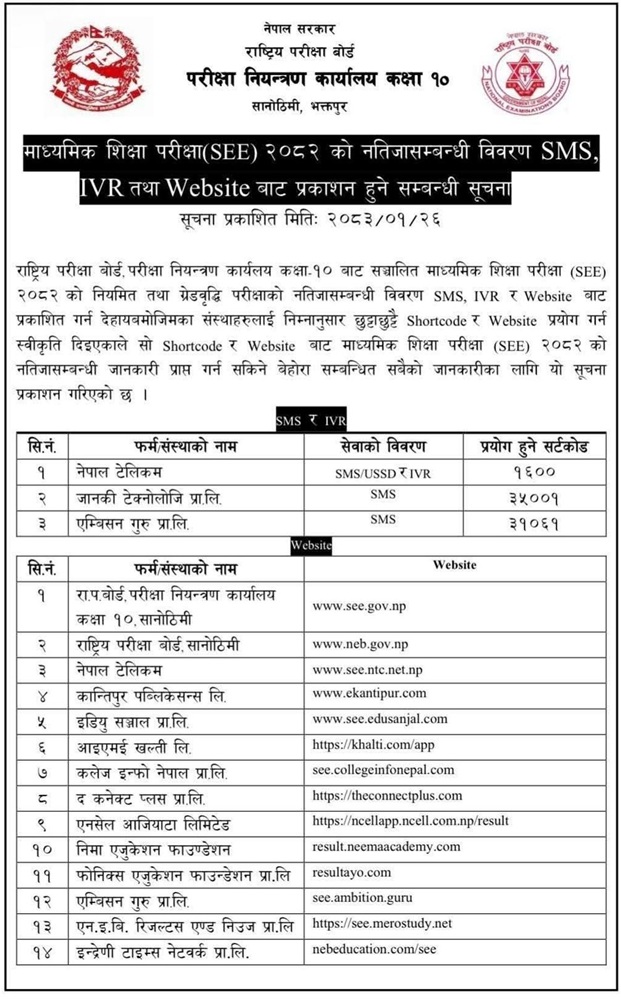
Here we present the official channels for the results as per the board. You may also find the results on various other platforms. You can choose one of them to check the results yourself. Some of these websites have also integrated the SEE result on their mobile app, like the Khalti app, etc.
Thankfully, it’s also possible to get SEE results on mobile apps. So far, we can confirm that the eSewa and Khalti mobile apps will provide SEE results. If you are less into dialing and browsing and more into apps, this is your easy way through.
Checking the result through either of these apps should be easy too. Just open the app and tap on the button for SEE 2082 result or something similar, then enter the details to get your result.
You can get the school’s ledger after the SEE result is out which offers details of all the students’ results of the school. Thankfully, finding it is easy. To get a school ledger of the SEE result, visit https://seeadmin.ntc.net.np/, enter the details, and submit.
All digital platforms to check SEE results 2082
NEB has provided the list of all the digital platforms to check SEE results for 2082. See the list below.
In conclusion
SEE exams are given incredible significance in Nepal. So, it is an extremely vital mark of reference for teachers, schools, students, and their parents. Also, we now see a remarkable evolution in the methods of checking the results.
There was a time when cyber cafes used to be busy overnight on the results time a decade ago. Now, the access to internet, smartphones, and digital platforms has significantly reduced the hassle. Websites, IVR/SMS, apps, etc. are available to check SEE results in a few seconds. So, it’s not an overstatement to assume that SEE result behavior represents Nepal’s growing digital transformation and technological advancement. Best wishes to all the students for their SEE results.
Frequently Asked Questions (FAQs) on how to check SEE result 2082/83 (2026)
For quick information on how to check SEE Result 2082/2083 (2026), here are the most Frequently Asked Questions (FAQs):
How can I check my SEE result 2082/83?
You can check your SEE result 2082 by SMS, Ntc website, other websites, eSewa app, or SMS/VAS services in Nepal.
When will SEE result 2082 be published?
NEB will publish SEE result 2082 in Mid-May (Third week of Baishak to first week of Jestha2083). As known, SEE result will publish on Baishak 28, 2083.
How do I get SEE result 2082 with a marksheet?
You can get SEE result 2082 with a mark sheet by entering your date of birth.
How do I get my SEE result by SMS in Ntc?
You can check your SEE result 2082 in Ntc by SMS by sending message an SMS in this format SEE> space to 1600 from any NT numbers.
Which apps can I use to check SEE results 2082?
You can use eSewa and Khalti apps to check your SEE result 2082.
Does the SEE result 2082 have an NG system?
Yes, the SEE result 2082 has been implemented with an NG system. That means students who fail to obtain at least 26.25 marks and 10 out of 25 marks in internal examinations will get an NG.
What is pass marks in SEE exam 2082?
To pass any subject in SEE exam 2082, examinees must score at least 26.25 marks out of 75 and 10 out of 25 in internal examinations (practical subjects).
How many subjects can I give grade improvement exams for after SEE results 2082?
Students can take grade improvement exams if they get NG in the initial results. If received “NG” even in over 2 subjects, students can take exams of those subjects in the grade improvement exams.
Can I check someone else’s SEE result using their symbol number?
Yes, you can check another student’s SEE Result 2082 using their symbol number and date of birth. The official portals such as see.ntc.net.np and see.gov.np do not require any login or personal verification — simply enter the symbol number and the registered date of birth of the student whose result you want to check. This is useful for parents checking their child’s result, or students checking on behalf of friends or family members who do not have internet access.
What if the SEE result website is not loading?
On result day, all websites experience heavy traffic as over 5 lakh students try to check simultaneously. If the site is not loading, wait a few minutes and try again. As an alternative, use the SMS method (SEE (space) Symbol Number to 1600) or call the IVR service at 1600 — these are faster and more reliable when websites are overloaded.
How do I check my SEE result 2082 in Nepal without internet?
You can check SEE result 2082 in Nepal without internet, by sending SMS or call IVR.
Tell us which one you prefer for SEE result 2082, in the comment box below.
Follow us on Facebook, Google News, and Viber to get the latest news, and information about Nepal Telecom, Ncell, Smart Cell, ISPs, mobile apps, and phones in Nepal.
Senior Editor; An experienced tech writer covering news mostly on telecommunication, internet, latest tech & trends, and Gadgets. Being a technophile, I am particularly fascinated by the evolution of mobile networks in Nepal from legacy networks (2G, 3G) to 4G (with VoLTE, VoWiFi, eSIM) and the prospects of the upcoming 5G, and equally enthralled by the development of internet from the dial-up connection to the 2 Gbps XGS-PON fiber broadband technology and their transformative impact in the country.