Last Updated on February 8, 2026
Speed Dial has been one of the key features on all mobile phones, from bar phones to Android and iPhones. Used to quickly place calls without having to dial phone numbers, it just does that. Dials an outgoing call, saves time. But not everyone may use it, even not for the lack of knowledge, but for not getting around with it that much. In this article, we explore how to use Speed Dial on Android and Favorites on iPhones and why it is still useful. Keep reading.
Table of contents
What is Speed Dial?
Speed Dial is a feature on mobile phones that allows users to dial pre-programmed numbers, which removes the need to manually enter the phone number or search for the contact in the contact list. The feature improves the efficiency and experience of phone users as they no longer have to memorize any number they need to dial or search in the contact list/phonebook.

Does Speed Dial still matter in 2026?
Yes, surely Speed Dial remains important even in 2026 and should be for the entirety till we all use phones to dial calls. Because it has to do with efficiency and convenience.
Smartphones, including budget and flagship phones, these days have AI voice assistants that can place calls with a voice command. Searching contact through 100s of contacts is also not that hard. However, they still take a few seconds to type, or a command may take a brief while to process. If an internet connection is required, then that can be less convenient for all, as not everyone rolls with always-on data.
But Speed Dial replaces those oddities with quick, simple work. Just set a contact to a certain number and press and hold it for a few seconds, then the call initiates. Isn’t that so easy!
Therefore, despite phones going smart and AI-powered, speed dial continues to be a key feature for all phone users. It helps with quick calls and is super useful while dialing a number for emergencies. As for the elderly, it’s even more convenient. Just have them program a certain contact to a particular number on the phone, and they won’t have to enter the number or search through contacts.
In the world that we passionately call fast-paced, saving a few seconds on calling is such a luxury, and Speed Dial just does that. So, it’s useful, people, very useful.
Summary: Benefits of Speed Dial
Here are some of the unmissable benefits of using Speed Dial:
- Quick access to important contacts on the phone
- Saves time, improves efficiency on dialing numbers
- Smart way to use a phone for placing a call
- Useful for the elderly
- Vital during an emergency
REMEMBER: Speed Dial won’t work for numbers 0 and 1 because they are reserved for operators and adding a voicemail number, respectively.
Find: How to Transfer Balance in Ntc SIM card [Latest Update 2026]
How to set up Speed Dial on Smartphones?
On Android?
Do these quick steps to set up Speed Dial on Android phones:
- Open Phone app
- Tap on the Keypad if it doesn’t open there
- Press and hold any number of your choice between 2 and 9
- A pop-up tells you to ‘Assign contact’
- Tap on Assign
- Choose or search to assign your contact to the tag that particular number to your contact
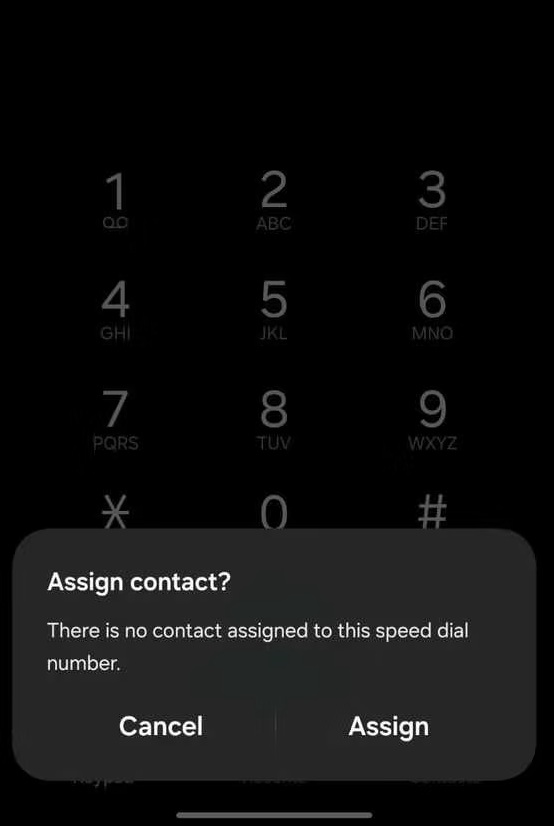
Now, every time you go to your phone app and tap and hold that particular number, the call is made to its corresponding contact.
On iPhone
It’s slightly different from Android, but essentially, it serves the same purpose. So, here are the steps to set up Speed Dial/Favorites on iPhones:
- Open the Phone app
- Tap Contacts
- Tap a contact you want to assign to Speed Dial
- Now, tap Add to Favorites
- Tap Call to add the contact to your Favorites
- If a contact has more than one number, then tap the down-arrow next to Call and choose one of the numbers to add to Favorites.
- To Speed Dial call, open the Phone app
- Tap Favorites
- Tap the contact to start a call
Also: How to monitor mobile data use on Android and iPhone? Set warning
Speed Dial vs Favorites: Key difference
Speed Dial serves as an immediate workaround to place calls to a contact using tap and hold functionality. Favorites is like a bookmark where you store many contacts to quickly dial calls without having to manually enter the number or search for the contact.
Both reduce the time otherwise taken to place calls in a regular style. However, in sheer convenience, Speed Dial tends to be more direct and easier.
What contacts should you assign to Speed Dial?
Speed Dial lets you choose 8 unique numbers. So, they have to be particular ones for your convenience. Here are the types of contacts you should choose for Speed Dial/Favorites:
- Calls you mostly dial: Use numbers you mostly dial on a regular basis. It helps reduce the time used for making calls.
- Emergency services: Assign a number that you can count during an emergency- police, hospital, ambulance, etc. It can be a contact that you may forget but need in an urgent need for help.
Conclusion: Everyone should set up and use Speed Dial
Every mobile phone user should use Speed Dial. The fact that it’s available on every phone makes a case in its favor. It’s easy to set up and hugely convenient later for making phone calls. It not only saves time, but can be helpful during an emergency or on a daily basis by helping cut time on calling your important numbers. You won’t have to navigate through options to search for a contact from the list, ‘Recent’, or memorize it.